AKEYX · Independent OKX User Guide
OKX cost calculator & guides
Estimate trading fees and funding with your own inputs. AKEYX is independent and is not the official OKX website.
Find a tool by task
Choose a calculation, process or security topic. These tools do not connect to your account or execute trades.
AKEYX GUIDES
Recent publications & updates
Six published guides in this language, ordered by their latest modification. Publication and modification dates are not necessarily full fact-review dates.
-
OKX Web3 Wallet Guide 2026: Self-Custody, DEX Swaps, Gas Fees, and Security
OKX Web3 Wallet is a non-custodial, multichain wallet in which users manage control of their assets and the means of recovery. Seed-phrase/private-key…
-
OKX funding fees: calculation, settlement and records
OKX Funding is an amount exchanged between holders of long and short positions at the settlement time of a perpetual contract. It…
-
OKX VIP Tiers 2026: Requirements, Fees, Benefits, and How to Check
OKX VIP is a program that determines fee tiers based on account assets or trading volume over the past 30 days. Entering…
-
OKX Referral Code OKDCC: Conditions and Verification
The OKX referral code OKDCC is a recommendation code included in the signup path; merely seeing the code does not guarantee a…
-
OKX Sign-Up, Fees, and Code: What to Check Before Getting Started
If you are reviewing OKX for the first time, check your residency, applicable entity, and eligibility for the products you plan to…
-
OKX Recurring Buy Guide 2026: Setup, Intervals, Fees, and Spot DCA Differences
OKX Recurring Buy is a spot trading bot that repeatedly purchases selected assets at set times and intervals. You can set the…
Trading fee & funding calculator
No login required. Enter your own verified account rates. Amounts are estimates in USDT terms.
Enter your account rates before calculating. Enter 0.05 for 0.05%. Use a decimal point (.) without thousands separators.
- Entry / buy fee
- Exit / sell fee
- Net funding paid (+) / received (−)
- Total paid (+) / received (−)
Formula, scope & limitations
Each fee = executed notional × rate / 100. Use notional, not margin. Funding = position value at assessment × per-assessment rate / 100 × number of assessments; the sign reverses for shorts. Value and rate are assumed constant, and funding applies only when held at assessment. Do not divide an already per-assessment rate by hours again.
Spot costs are USDT equivalents; the actual fee currency can differ. Excludes inverse/coin-margined contracts, options, interest, spread, slippage, conversion, withdrawal and liquidation costs, rebates and trading P&L. Intervals, rates and value can change. Negative trading rates assume a fee credit. Inputs are not sent to a server or stored. No trade, return or eligibility guarantee.
Official references checked · 2026-10-30
OKX pre-transfer checklist
Choose what you have checked on both sides before an on-chain transfer. Internal transfers, bridges and swaps are outside this checklist.
Open checklist
No address, amount or personal data entry and no wallet connection. This tool does not send or store your selections.
Choose options, then review what remains unchecked.
Sending exchange: read the withdrawal minimum, limit, fee, final receiving amount and security checks.
Sending wallet: check the selected network’s gas balance and final confirmation screen. Failed transactions may still incur fees.
Receiving exchange: check the deposit screen for the supported token, network, current address, Memo/Tag and minimum amount.
Receiving wallet: check the receiving account, network and token support. Never share a seed phrase or private key.
Results rely only on your selections. They do not verify an actual address, network, balance or eligibility, or guarantee delivery, recovery or safety. If unsure, stop and consult official support on both sides. Even a small test must meet minimums and costs and does not guarantee success.
Official sources and review scope
API error code finder
Choose an error code, connection type and environment to see official definitions and checks. Version 1 covers five REST errors.
Check an error
No API key, Secret, Passphrase or raw logs. No account connection or API requests. This tool does not send or store selections.
Choose the three items, then view the checks.
50004 — API endpoint request timeout
A timeout is not the final success or failure of the request. For an order, first reconcile its identifier with official order and fill queries. Do not create duplicate orders by resending while the outcome is unknown.
50011 — Rate limit reached
Check the endpoint’s current rate limit and scope, parallel requests and retries. Reduce request frequency and follow official limits and backoff guidance. Do not retry indefinitely or bypass limits.
50101 — APIKey does not match current environment
Check that live or Demo keys match the request environment. Compare the REST Demo header and official regional endpoint. Do not bypass regional or security restrictions to remove the error.
50102 — Timestamp request expired
Check the request timestamp’s UTC format, difference from server time and clock synchronization. The official server-time path is GET /api/v5/public/time. Changing the displayed timezone or repeating a stale request is not a fix.
50113 — Invalid signature
Locally compare the timestamp, uppercase method, requestPath including query, and actual body used for REST signing with what was sent. Check HMAC SHA256 to Base64 and UTC timestamp format in official authentication docs. Do not enter keys here.
Environment unknown: check the key environment, request environment and official regional endpoint first. This tool does not inspect accounts.
Live selected: compare the key environment and official endpoint. Check open orders, fills and positions before retrying live requests; avoid duplicate orders.
Demo selected: check a Demo key and supported functions. For REST Demo requests, compare x-simulated-trading: 1 and the official regional endpoint. This does not instruct you to use that header for WebSocket.
General checks only: no account, permission, signature, current-limit or order-status inspection. Do not share credentials, disable restrictions or test with live trades. Consult official support outside this scope.
Official sources and review scope
Order conditions and unfilled orders
Select the product, order type and displayed status to find checks. General guidance covers cash spot, excluding margin, and USDT perpetuals.
Check order conditions
No prices, quantities, balances, order IDs or API keys. No account connection or order placement, amendment or cancellation. This tool does not send or store selections.
Choose the product, order type and status shown on your screen.
Limit: execution is possible only at the limit price or better. A price touch does not guarantee a fill; check available depth, queue priority and remaining size.
Market: the fill price is not guaranteed. Liquidity, price limits or protection rules can leave a remainder. Check actual status before duplicating an order.
Trigger/TP/SL: activation submits an order; it is not a fill. Distinguish the algo order from the resulting regular order, and trigger price from order price.
Partial fill: distinguish executed size from the remainder. Cancelling a remainder does not reverse completed trades. This tool does not cancel orders.
Cancelled/rejected: read the actual reason in order history first. Fills made before cancellation remain. This result is not an instruction to resubmit automatically.
Fully filled: this is different from a currently unfilled order. Check filled size, average price and time. This tool does not close a position or place an opposite order.
Post Only: an order that would immediately match existing liquidity may be cancelled. Neither resting in the book nor a maker fill is guaranteed.
Reduce Only: intended to reduce an existing position. Check actual position mode, direction, size and other closing orders. A request with no position or increasing exposure may fail.
IOC: immediately available size can fill; the remainder is cancelled. Partial execution and remainder cancellation do not by themselves mean an error.
FOK: if the entire size cannot fill immediately, the whole order is cancelled. Touching a displayed price does not prove enough liquidity.
An unknown additional condition is not None. Check supported conditions and actual selections on the order screen.
The trigger basis and whether it was reached are unknown. Check the actually selected Last, Mark or Index price and condition.
If the selected reference price has not met the condition, the trigger may remain pending. Compare the actual monitoring conditions with the official screen.
An observed price touch is not proof of a fill. Check the same reference price, trigger and resulting-order status, margin and price limits.
Do not judge a trigger using a different price type. Compare the selected Last, Mark or Index price with the current order screen.
General guidance from your selections; no live price, order book, balance, position, order-status or regional-eligibility checks. One additional condition is checked at a time, not the full configuration. No fill, stop-loss or profit guarantee or trading recommendation. Current product, account mode and official screen govern.
Official sources and review scope
Web3 approval & signature precheck
Select the request shown in your wallet and what you have checked. This tool does not inspect or authorize a real request.
Open checklist
No wallet connection, address, raw signature or personal data input. This tool does not transmit or store selections.
Use the current wallet screen to answer.
Connecting may reveal your account address to a DApp. Distinguish connection from token approval and transaction signing; review each later prompt separately.
Even a login prompt requires reading the message, domain and permissions. A signature may grant authority; no gas fee does not mean no risk.
Check the token, spender, allowance and expiry. Understand unlimited approvals and review existing approvals in the official wallet approval manager. This tool does not revoke them.
Check network, recipient, amount, contract actions, fees and permission changes in the wallet. A preview or simulation cannot guarantee detection of every risk.
Do not give a site or support contact your seed phrase, private key or verification code. Pause unexpected owner, signer or permission changes and check with official support.
Independently compare the exact site origin, purpose, target and permissions. If unclear or missing, do not proceed; check with official support.
General guidance based on your selections. No real site, address, signature, contract, approval history or balance is inspected. No safety, recovery or profit guarantee; no signing, transfer or revocation is executed.
Official sources and review scope
Spot DCA planned capital calculator
Estimate each order and cumulative principal assuming the initial order and all additional orders execute in one cycle. No real trading is performed.
Open calculator
No account or wallet connection or personal data. This calculator does not transmit or store inputs.
Use a decimal point (.) without separators. Up to 8 decimal places for amounts, 4 for multiplier. Tool limits: amounts/total up to 1 trillion USDT, multiplier 0.01–10, 0–100 additional orders. These are not OKX setting limits. With 0 additional orders, A and m may be blank.
Enter assumptions, then calculate.
- Planned principal (USDT)
- Budget−total (USDT)
- Total planned orders
The table scrolls horizontally and vertically within its own area.
| Order | Amount (USDT) | Cumulative (USDT) |
|---|
Formula, scope and limitations
Additional order j = A × m^(j−1). Total = B + sum of additional orders (j=1…N). The first additional order is not multiplied. This is an amount multiplier, not a price-step multiplier.
Round each planned order to 8 decimal places, then accumulate. Unnecessary trailing zeros are shortened. Actual pair precision and minimum-order rules are not modeled.
One cycle’s planned principal in USDT only. Excludes fees, slippage, price spacing, repeated cycles and trading P/L. No actual fills, balance, capital reservation or regional eligibility checks. No recovery or profit guarantee or recommended settings. Check actual conditions on official screens.
Official sources and review scope
Spot Grid price-level preview
Calculate boundary prices and gaps from lower/upper prices, interval count and arithmetic/geometric mode. No real orders or return forecasts.
Enter a price range
No account/wallet connection or personal data input. This tool does not transmit or store inputs.
Use one quote currency for all prices. Decimal point (.), up to 8 decimals; prices above 0 and at most 1 trillion; integer intervals 1–100. These are AKEYX tool limits, not OKX settings limits.
Enter the range and interval count, then run the preview.
- Boundary price levels
- Intervals
- Theoretical price gap
Left is lower, right is upper. Diagram positions are approximate; use the table for displayed numeric values.
Scroll horizontally or vertically inside the table region.
| Index i | Price | Gap from previous price |
|---|
Formula, scope and cautions
Arithmetic:Pᵢ=L+(U−L)×i/N. Geometric:Pᵢ=L×(U/L)^(i/N). i=0…N;Nintervals give N+1 boundaries. These do not specify actual buy/sell order count or direction.
Each level is rounded to 8 decimal places; gaps subtract displayed prices. Rounding can make displayed arithmetic gaps or geometric ratios differ slightly. Geometric percentage change is shown to 6 decimals. Actual pair tick sizes are not modeled.
Fixed-range spot illustration only. No current price, quantity, capital, min order, balance, fees, slippage, trailing, TP/SL, fills or P&L calculation. No futures/margin support, range recommendation or profit guarantee.
Official sources and review scope
Copy trading metric interpreter
Choose the product, metric and checks to see meaning, limits and missing context. No trader rating or recommendation.
Review a metric
No account connection, personal data, trader names or trading records. This tool does not transmit or store selections.
Select a metric, then show its interpretation.
Product and scope
Product is unknown. Check whether the actual screen is spot or futures and read its metric definition.
Check the spot-copy screen’s definition, valuation time and costs. One metric cannot establish asset-price risk or losses.
For futures copy, also check leverage, funding and liquidation risk. Performance metrics alone do not describe these risks.
Meaning of this metric
The official FAQ defines PnL as cumulative PnL of lead trades opened by lead traders. It is not necessarily your copied account’s actual PnL.
The FAQ describes PnL% as cumulative percentage PnL of lead trades. Check the capital base, period and deposit/withdrawal treatment on screen. It is not annualized or forecast profit.
This FAQ’s market-board win rate uses days with profit / days leading trades × 100%. Do not assume every screen counts winning trades. Loss size and unrealized PnL need separate checks.
The FAQ describes AUM as total copied assets of traders currently copying the lead trader. It is not the lead trader’s own balance, safety certification or profit guarantee.
The FAQ’s Copy trader PnL is total copy PnL of all current copy traders. It is not your PnL, a typical user’s average or future performance.
Context to check
Period is unchecked. Verify start/end dates and cumulative versus recent-period labels before comparing.
Even with a known period, compare matching periods, calculation bases and update times. Past performance does not guarantee future results.
Unrealized PnL treatment is unchecked. Check whether open-position valuation enters the figure.
If unrealized PnL is included, open-position price changes can move the metric. Do not treat it as locked-in profit.
If excluded, open-position PnL can remain outside the figure. Exclusion does not mean there are no unrealized losses.
Costs are unchecked. Separately verify applicable trading fees, funding and profit sharing in the metric.
Even after checking costs, distinguish which costs enter which figure. Your fills, allocation and settings can make actual PnL differ from the lead trader’s.
No actual account, trader or metric lookup or authenticity verification. Checked selections are user statements, not tool validation. No scores, ranking, trading, safety verdict or return forecast.
Official sources and review scope
Account modes: cross and isolated fund structure
Choose a mode concept, margin setting and balance topic to compare fund scopes. No actual account eligibility or amounts are assessed.
Choose a structure
No real balances, positions, personal data or account connection. This tool does not transmit or store selections.
Choose a mode concept and margin setting. Leave margin unknown for the unborrowed spot example.
Account-mode concept
An example of unborrowed spot holdings and reserved balances, not a list of every Spot-mode product or verification of your settings.
Single-currency cross considers margin and PnL within the relevant settlement currency. For isolated, inspect allocation to that isolated unit separately.
Multi-currency cross uses adjusted valuation of eligible assets in a common unit. Eligibility, discounts and liabilities matter; not every coin or total balance automatically counts in full.
Portfolio concepts consider risk units and product-offset conditions. Not a simple balance sum or guaranteed offset. Only the cross concept is shown here.
Margin setting
Within a cross scope, multiple positions can affect shared margin. First check which currencies, assets and products belong to that scope.
Isolated separates allocated margin and PnL for the chosen isolated unit. Check the unit, additional allocation and costs; this does not mean every other balance is fully protected or risk-free.
Balance topic
Balance topic is unknown. The diagram is conceptual and does not calculate usable or transferable amounts.
Equity reflects balances, valuation PnL and other items. Check screen definitions for isolated assets, liabilities and interest. It is not all available for orders or withdrawal.
Order-available amounts can be affected by reserved orders, margin requirements, costs and liabilities. Do not equate them with total balance or equity.
Check the transfer/withdrawal screen’s amount and restrictions separately. It serves a different purpose from equity or order availability; this tool neither calculates nor transfers it.
Conceptual fund scopes
Reference structures, not actual money flows or proof that every mode supports isolated. Blue borders mark selection, not a safety rating.
Cross
- Shared cross margin in that scope
- Cross positions and valuation PnL in scope
Isolated
- Margin allocated to the selected isolated unit
- Positions and valuation PnL of that isolated unit
- Check extra allocation, costs and other balances separately
Unborrowed spot holding example
- Spot assets held
- Distinguish usable and reserved portions
Mode names and availability depend on region, account and version. Funding and Trading accounts are distinct. No collateral, leverage, liquidation price, maximum order or automatic margin-addition calculation; no mode changes, orders, transfers or safety recommendations.
Official sources and review scope
Before You Register
Four Things to Check Before Opening an Account
Do not register based on a promotional headline alone. Confirm referral attribution, regional availability, identity requirements and transfer conditions first.
Verify the Rebate in Your Account
OKX's Affiliate FAQ states that an invitee's rebate rate can range from 0% to 20%. Confirm the actual terms attached to the OKDCC link on the sign-up page and in My Rewards.
Check Regional Access and KYC Rules
Available products and accepted documents may differ by jurisdiction. Enter details that match your valid identification and complete verification using the latest version of the app.
Match the Network Before Every Transfer
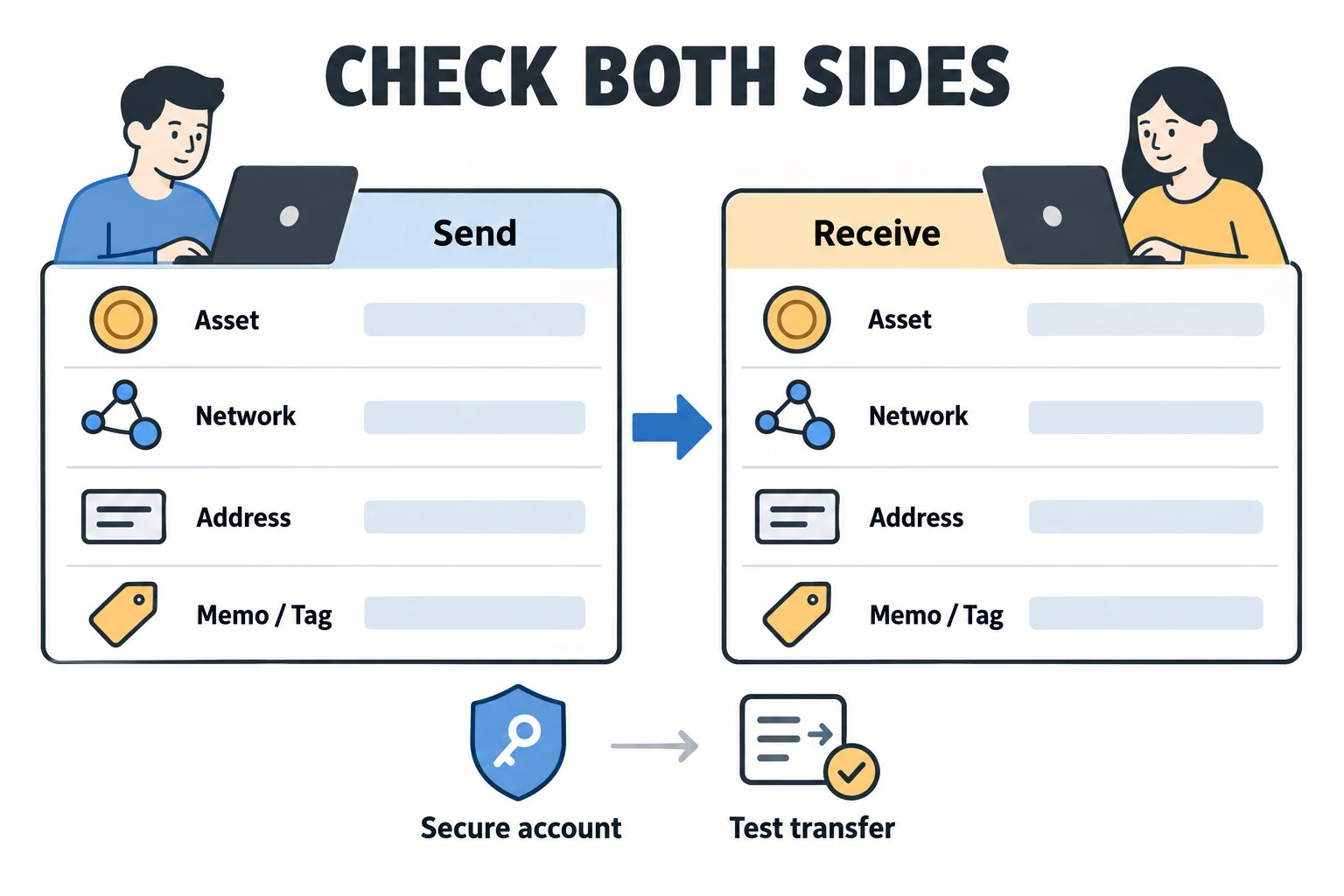
If you decide to transfer assets, compare the asset, network, address and Memo/Tag at both ends. Consider a small test only after checking minimum deposits and fees; it does not eliminate all transfer risks.
Understand Product and Leverage Risk
Derivatives and margin trading can lead to rapid losses and forced liquidation. Maximum leverage varies by product, jurisdiction and account, so do not rely on one fixed figure.
Before creating a new account, check the code and displayed terms on the registration screen. Whether an existing account can change its affiliate relationship depends on regional and account eligibility and OKX approval rules; confirm with official customer support. OKX Affiliate Program rules — existing accounts and regional eligibility ↗
AKEYX Guides
All detailed guides
Choose a guide for your question. This page is a directory; check each article and official sources for product availability, regional conditions and detailed procedures.
Quick Start
How to Get Started with OKX
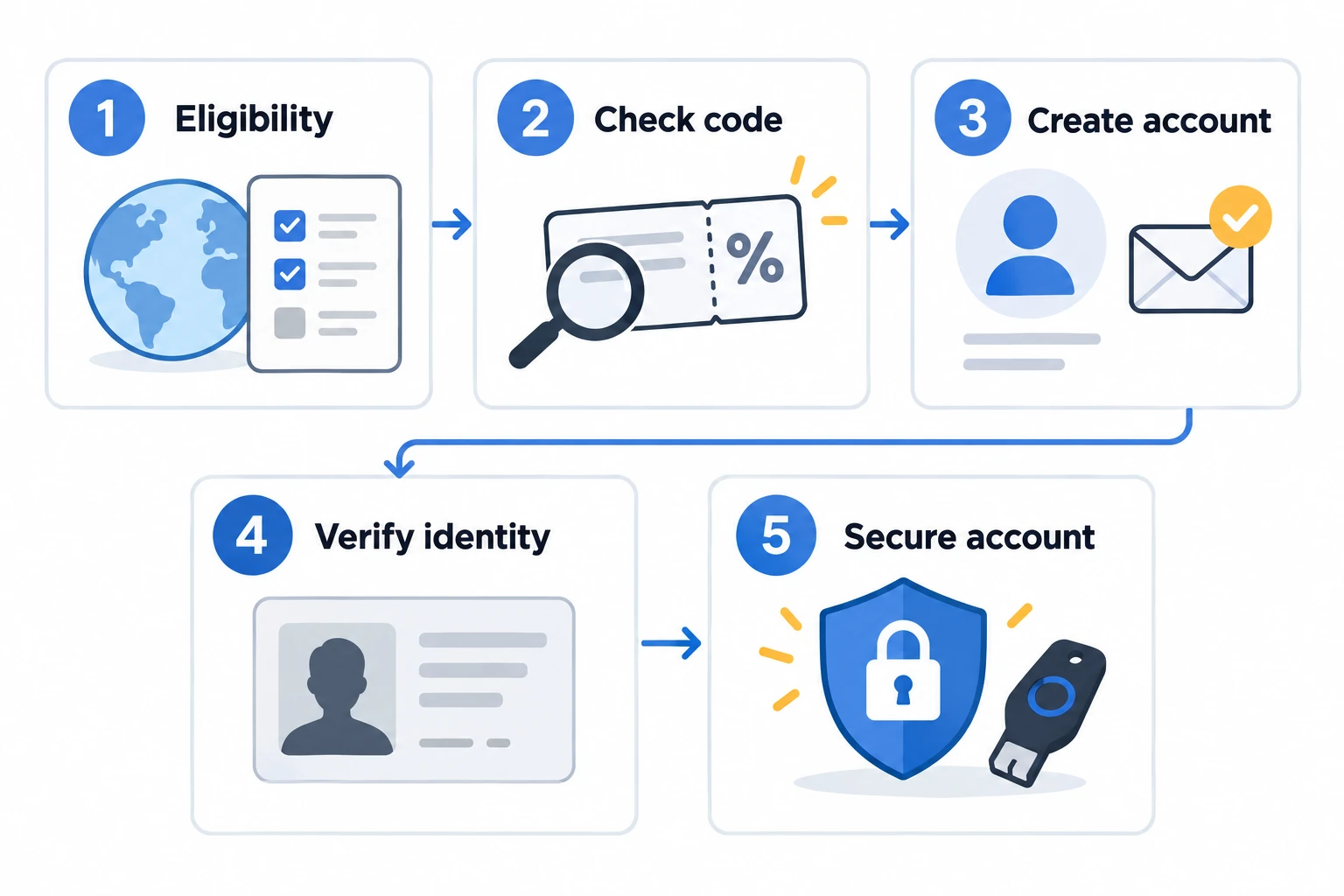
Account creation, identity verification and security setup are separate from depositing assets. The sign-up guidance below does not require a deposit or a trade. Check eligibility and the current screens for your residence, account and app version.
Check eligibility and the official screen
First check eligibility for your place of residence, then open the registration screen in the official app or at okx.com directly.
Create the account; check an optional code
Create the account using your own information. A referral code is optional; if you use one, check it and the displayed terms before completing registration.
Complete Identity Verification
Use accurate personal details and a valid ID. Submit a selfie and proof of address if requested.
Set security; check before a transfer
Set up two-factor authentication and withdrawal security first. A deposit is a separate asset transfer. If a transfer is needed, check the asset, network, address, Memo/Tag, minimum deposit and fees.
Fees
How OKX fees work
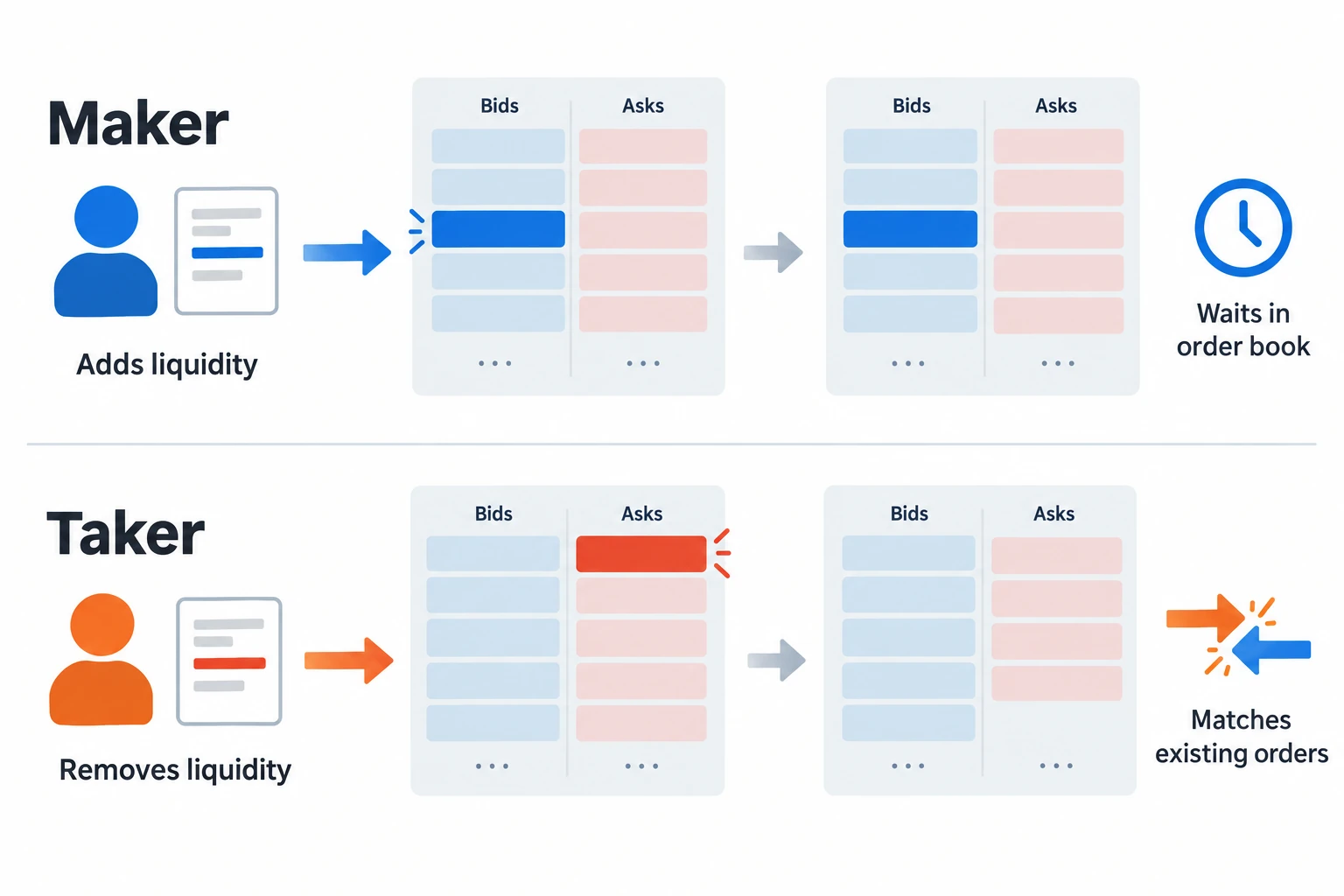
Trading fees depend on the product, account tier and maker/taker execution. A limit order does not guarantee a maker fee. Check the rate displayed in your account before submitting an order.
Derivatives may incur funding fees separately. Spread, slippage and withdrawal costs are different from trading fees; a rebate does not necessarily cover them.
Referral & Fees
OKDCC and applicable conditions
A “20% rebate” does not mean that the trading fee rate falls by 20 percentage points. It means that 20% of eligible trading fees would be returned under the applicable rebate terms.
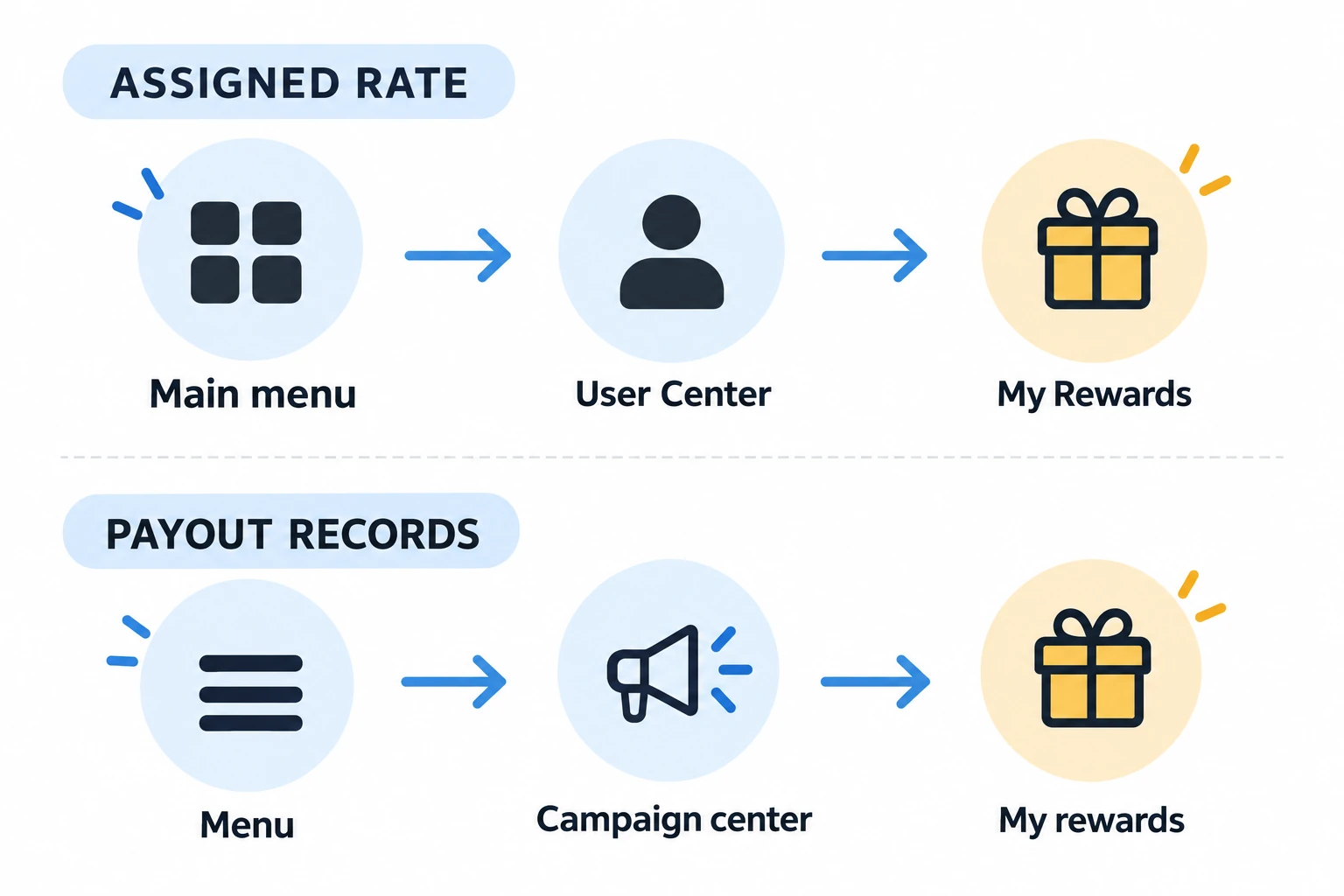
Check code attribution before completing registration. Use the separate routes below for the assigned rate and payout records. A code in a link does not establish your actual rate or duration.
Main menu → User Center → My RewardsMenu → Campaign center → My rewards
If eligible trading fees total 10 USDT, the calculated rebate would be 2 USDT. Your account page remains the final reference for eligible trades, credited amounts and exclusions.
| What to Check | Where to Check · Important Note |
|---|---|
| Referral code attribution | Registration page before completionImportant Note: Confirm regional/account eligibility and the procedure with official support |
| Assigned rebate rate | Main menu → User Center → My RewardsImportant Note: No visible module may mean no rebate was assigned |
| Rebate records | Campaign center → My RewardsImportant Note: Credits may be delayed and some trades may be excluded |
| Base trading fee | Official OKX Fees pageImportant Note: Varies by tier, product and Maker/Taker status |
Security & Transfers
Commonly Missed KYC and Transfer Checks
Match Your Account Details to Your ID
Your name, date of birth, country of residence and other details should match your supporting documents. Blurry or cropped images, expired IDs and an obstructed face can delay or prevent verification.
Verify Both the Address and Network
The same asset may exist on several networks. Confirm that both platforms support the same network, then recheck the first and last characters of the copied address and any memo or tag.
Check the Other Platform's Current Rules
Supported counterparties, transfer limits and additional verification steps can change. Review the current notices of both the sending and receiving platforms immediately before transferring.
Avoid Phishing and Impersonation
Check the official domain in the address bar and be cautious with search ads or links received through messaging apps. Never share a password, authentication code or wallet seed phrase.
Regional rules: Availability and transfer requirements vary by jurisdiction. Before sending funds, confirm that both platforms support the asset and network, and review any account-ownership, beneficiary-information or Travel Rule requirements that apply to your location.
Balanced View
Features and limitations
| Area | Feature or verification point · Limitation or Risk |
|---|---|
| Unified Account | Manage multiple supported trading products within one account structureLimitation or Risk: Available products and requirements differ by region and account mode |
| Proof of Reserves | OKX publishes a 1:1 reserve standard and recurring PoR reportsLimitation or Risk: PoR is a point-in-time verification tool, not a guarantee against investment losses or every operational risk |
| Trading Features | Access to a broad range of spot, derivatives and trading toolsLimitation or Risk: Complex features and leverage can increase losses and liquidation risk, particularly for beginners |
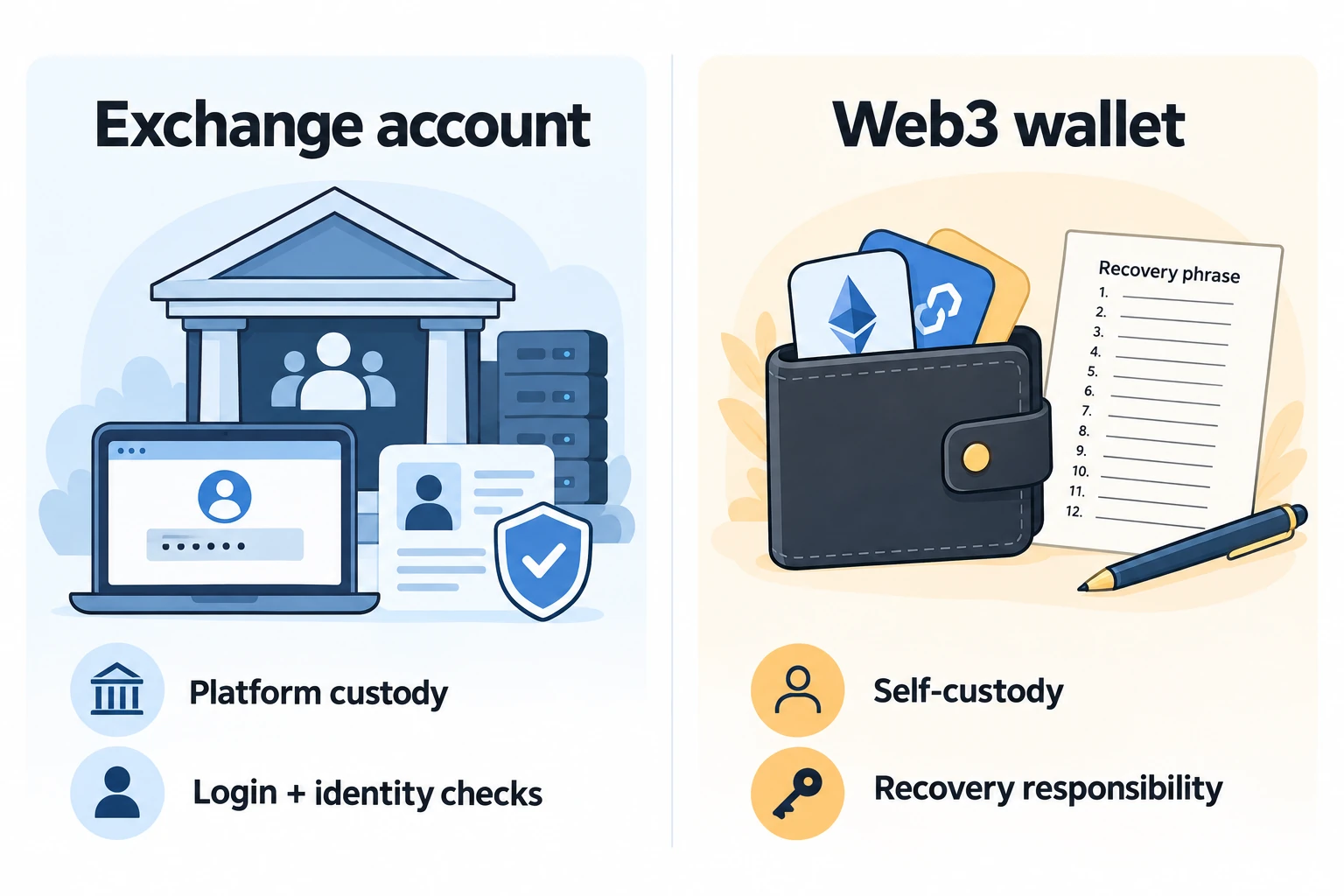
| Web3 Wallet | Access on-chain assets and a range of Web3 functionsLimitation or Risk: Self-custody places seed-phrase, smart-contract, bridge and phishing risks on the user |
FAQ
Frequently Asked Questions
Must I deposit assets before following the sign-up guide?
Account creation, KYC and security setup are different from depositing assets. This page's sign-up guidance does not require a deposit or a trade. Actual service access depends on residence, account and verification conditions. If you choose a service that needs an asset transfer, separately check supported assets, networks, minimum amounts and costs.
Does everyone receive 20% when signing up with OKDCC?
The same rate does not apply to every account. According to the OKX Affiliate FAQ, an invitee's rebate rate can range from 0% to 20%. Check your assigned rate and records in My Rewards. The displayed terms may vary by region, account and campaign.
Can I add a referral code to an existing OKX account?
Adding a code or changing an affiliate relationship for an existing account depends on regional and account conditions. OKX describes an invitation, application and approval process for existing users in certain regions, but it is not available to every account. Ask official customer support about your eligibility and procedure. Do not bypass restrictions by deleting and recreating accounts or inviting yourself through multiple accounts.
Do I need KYC to use OKX?
OKX's official guidance requires identity verification for individual-account use and states that trading, deposits and withdrawals are available after verification. Detailed requirements and product availability may vary by region.
Does Proof of Reserves make assets completely safe?
No. Proof of Reserves is a transparency mechanism that verifies account assets and reserve holdings at a specific point in time. It does not eliminate market, account-security, operational, regulatory, third-party custody or on-chain risks, and it does not guarantee principal.
Primary Sources
Official Sources to Verify
Benefits and policies can change. Before taking action, recheck the latest OKX pages and the terms displayed in your own account.
- OKX Affiliate FAQ — rebate rates, records and attribution ↗
- OKX Individual Account Verification Guide ↗
- OKX Proof of Reserves ↗
- OKX Unified Account Introduction ↗
- OKX Trading Fee Details ↗
- OKX · Security & transfers ↗
- OKX · Check eligibility and the official screen ↗
· This update checked rebate routes, KYC, fee structure and reserve disclosures. Individual account rates and durations were not verified.
· On 2026-10-18, only the existing-account affiliate guidance, related FAQ and structured data, and guide links were checked and updated. This does not represent a full review of other policies or verification of individual account rates.
· Official registration, KYC and transfer guidance was compared to distinguish sign-up from deposits and improve navigation, tables and mobile readability. Existing images, notices, figures and earlier review scopes were preserved. This is not confirmation of eligibility, rebate rates or periods for an individual account.
External registration page and terms
The link below opens the OKX registration page with OKDCC. Using a code is optional. Review displayed conditions, regional eligibility, privacy information and terms before deciding whether to register. No deposit or trade is needed to check conditions.
View registration page and code ↗Crypto assets and derivatives involve rapid price movements and the risk of losing principal. This page is not investment advice or a guarantee of returns.