Affiliate disclosure: This article contains an OKX partner link. If you register or trade through it, the site operator may receive compensation. User benefits vary by account, region, VIP tier and campaign; check the sign-up page and My Rewards for the terms actually applied.
When reviewing how to trade OKX futures, first distinguish eligibility to use products by region, the contract’s settlement asset, margin requirements, and liquidation conditions. Perpetual futures are derivatives, unlike spot trading in which you hold crypto assets, and can provide exposure to a large position with a small amount of margin. You can learn how to place and close orders in demo mode, but using the demo or completing KYC does not guarantee eligibility for live trading or control over losses.
This article is an informational resource that explains the interface and calculation structure using USDT margin perpetual futures as an example. It does not recommend using any particular contract, margin mode, or leverage. AKEYX reviewed the official materials on 2026-10-24, which is different from the publication or revision dates of the official documents listed below. The products, rates, and limits actually available vary depending on your place of residence, contracting entity, account mode, and timing.
South Korean residents should check eligibility for futures trading first
OKX’s Risk and Compliance Disclosure (revised 2026-07-08) states that derivatives-related services and P2P services may be restricted in South Korea. Do not assume that you are eligible to use a product just because you can access the platform or see a trading interface. The general steps in this article apply only to accounts whose eligibility has been confirmed. If a restriction is displayed, do not deposit or place orders; check the applicable terms and conditions and confirm with official customer support.
We do not provide instructions on bypassing restrictions using a VPN, another residence or identity, or duplicate accounts. Account creation, KYC, and product permissions are separate matters. Review the scope of checks for users in South Korea separately alongside the guide to checking OKX terms of use in South Korea. The complete checklist for registration, security, and custody is linked in the OKX Essential Guide.
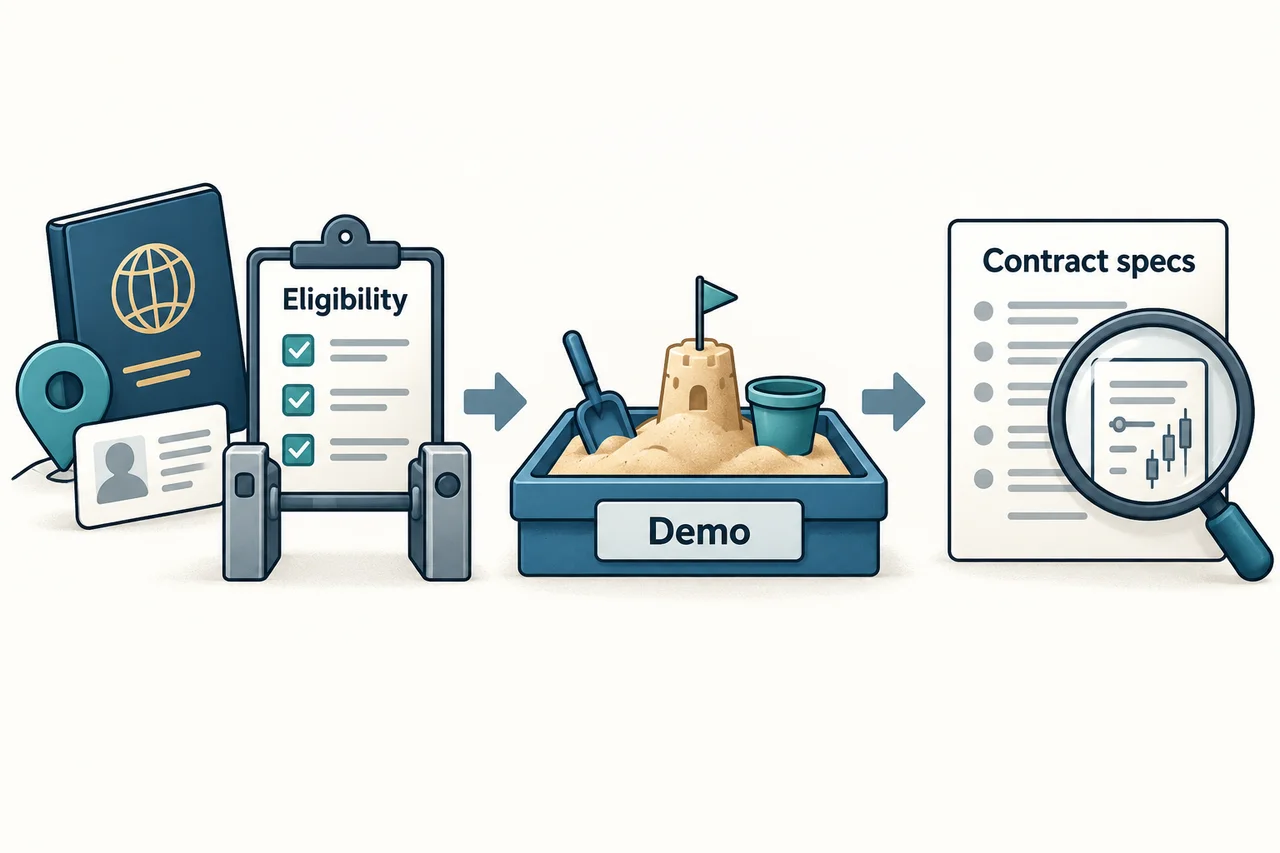
Steps for distinguishing contracts, orders, and closing in demo mode
The official demo guide (revised 2026-08-11) describes the paths Menu → Demo trading in the app and Trade → Demo trading on the web. The practice example is Perpetual → USDT-margined → BTCUSDT perpetual, but this is not a recommendation of a specific asset, and menus and availability may vary by region and version. First check whether the current mode is Demo or Live.
- In demo mode, check the contract name and the margin and settlement assets.
- Check whether the order quantity is specified in contracts, coin quantity, or notional value.
- Distinguish unfilled orders from filled positions and check for partial fills.
- After setting TP/SL, compare the trigger basis, order price, and closing quantity.
- After closing a position, check separately that the quantity is 0 and whether any orders remain.
Demo assets are not real funds and cannot be withdrawn. To reset, first close open positions and cancel unfilled orders, then select Reset under demo assets. Demo fills and returns do not replicate actual liquidity, slippage, delays, or psychological pressure. Paths and troubleshooting are covered in the OKX Demo Trading Guide.
Check perpetual contracts, margin, and settlement assets
Perpetual futures do not have a fixed expiry date, but you cannot keep holding a position if you fail to meet the margin requirements. Funding adjusts the difference between the contract price and the spot price of the underlying asset, with payments exchanged between longs and shorts based on their position direction and rate at settlement. No expiry does not mean there are no holding costs or liquidation risks.
| Item to check | Meaning and points to note |
|---|---|
| USDT-margined contracts | Margin and P&L are calculated in USDT according to the contract specifications. The price, issuer, and platform risks of USDT remain separate. |
| Coin-margined contracts | Settled in a specified asset such as BTC. The value of the collateral asset and the contract P&L may change together, and the formula for USDT-margined contracts does not apply. |
| Funding and Trading accounts | The official general guide describes internal transfers from Funding to Trading. This is different from an on-chain deposit; check the source and destination accounts, asset, and quantity. |
| Contract specifications | Check the minimum order, quantity increment, contract value, price limits, position tiers, maximum leverage, and settlement currency. If information is not shown, do not guess and place an order. |
The path above is based on the official Perpetual Futures Guide (revised 2026-10-12). It is not a recommendation to move funds or place an order. Prioritize the current account mode and product specifications applicable to your account.
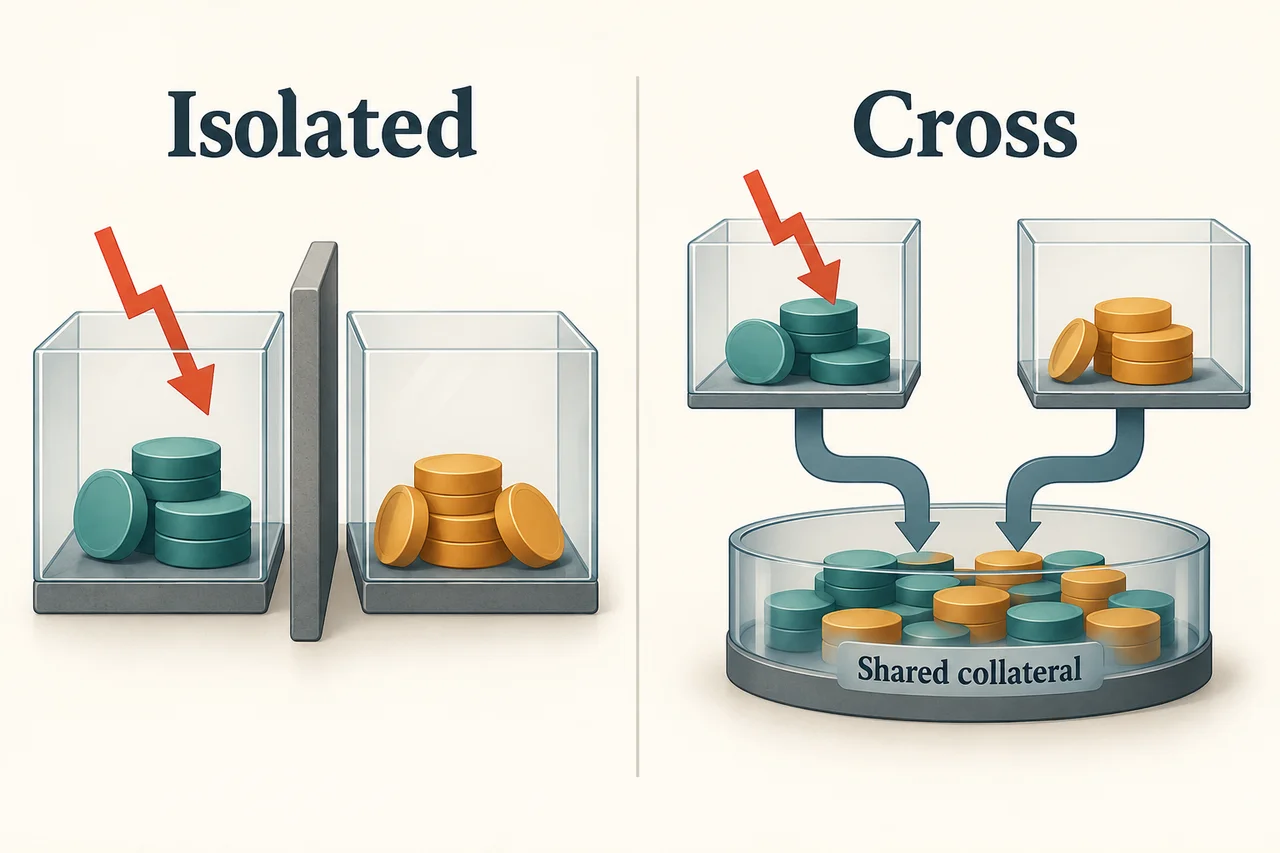
Isolated and Cross: Which collateral is exposed to risk?
Isolated separates the margin allocated to a particular position, while Cross shares collateral recognized under the account mode. You cannot assume that Cross always uses every asset in the account in the same way. Check not only the name for each position, but also the collateral scope, automatic margin addition settings, and current account mode.
| Mode | Risk to check |
|---|---|
| Isolated | If the allocated margin is insufficient, the position may be liquidated. Adding margin also exposes that additional amount to risk. |
| Cross | A loss on one position may reduce shared collateral and the available margin for other positions. Opening positions in both directions does not eliminate risk. |
Margin, leverage, and position value are different figures
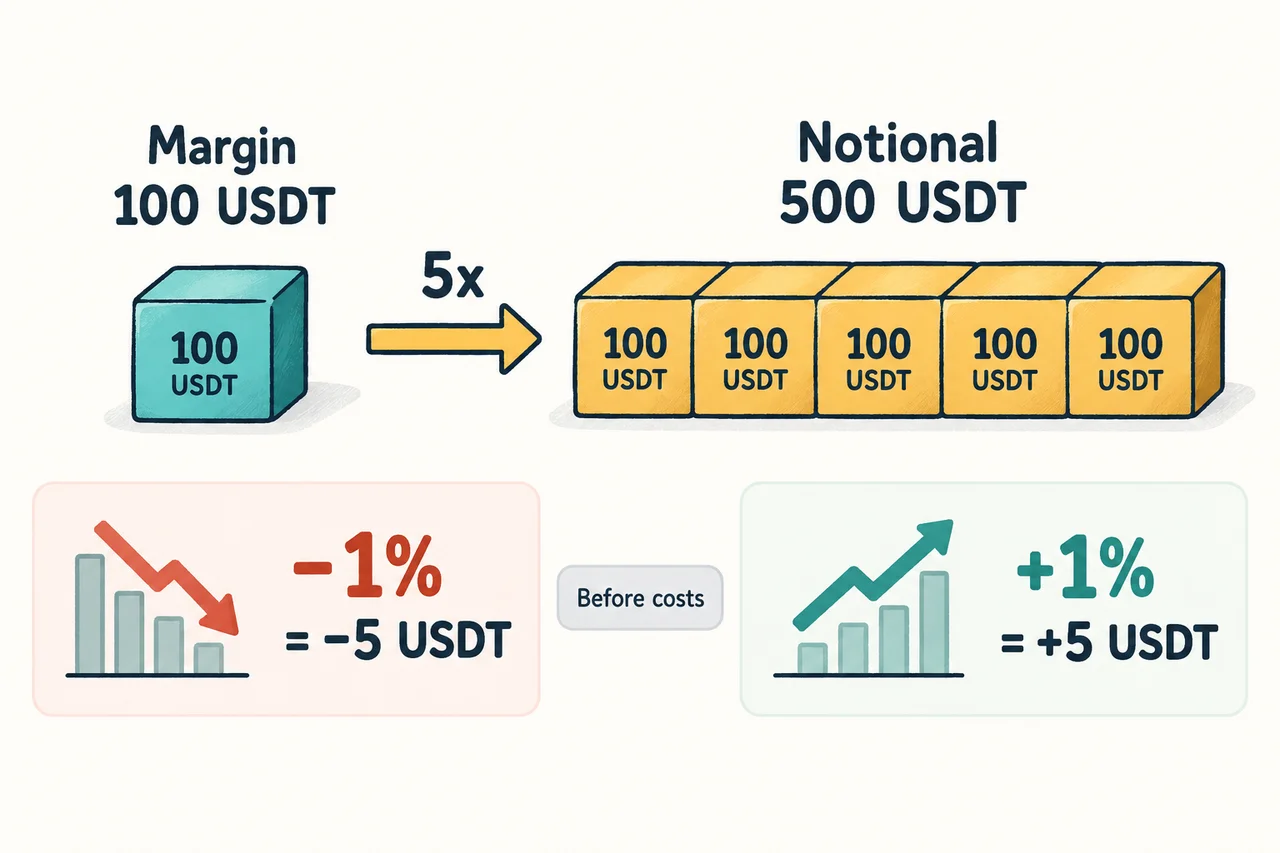
Leverage provides exposure to a large notional position with a small amount of initial margin. The following is a hypothetical calculation for a long position in a USDT linear contract, excluding fees and funding, and is not an example of actual maximum leverage or a liquidation price. P&L from price movements should be understood relative to the position size.
| Assumption | Calculation and interpretation |
|---|---|
| Initial margin of 100 USDT, 5× leverage | Simple notional position: 100 × 5 = 500 USDT. Costs and margin requirements may further affect the amount that can actually be ordered. |
| 1% price decline for the same quantity of a long position | P&L before costs is approximately 500 × (−0.01) = −5 USDT. That is approximately −5% relative to margin, but this is not a liquidation price calculation. |
| 1% price increase for the same quantity of a long position | P&L before costs is approximately 500 × 0.01 = 5 USDT. Trading costs and funding must be accounted for separately in actual net P&L. |
Changing only the leverage setting does not automatically change the absolute P&L from a price movement for a position of the same size. Initial margin and liquidation buffer may differ. Conversely, opening a larger position with the same margin increases absolute P&L exposure. Do not assume that lower leverage is safe just because it is lower.
Orders and TP/SL: meeting a condition is not the same as getting filled
A market order prioritizes execution but does not guarantee the expected price, while a limit order sets a price but does not guarantee execution. A limit order that immediately matches an existing order may be Taker. Reduce Only is a condition intended to reduce an existing position when the setting is permitted; check the position mode, order direction, and quantity together. For details on the differences, see the OKX Guide to Futures Order Types.
The official TP/SL guide (revised 2026-08-26) explains that when the selected trigger basis—last traded price, mark price, or index price—reaches the trigger, the configured order is submitted. TP/SL can also be added to an open position. Check the trigger basis, trigger value, submitted order price, and closing quantity as separate items.
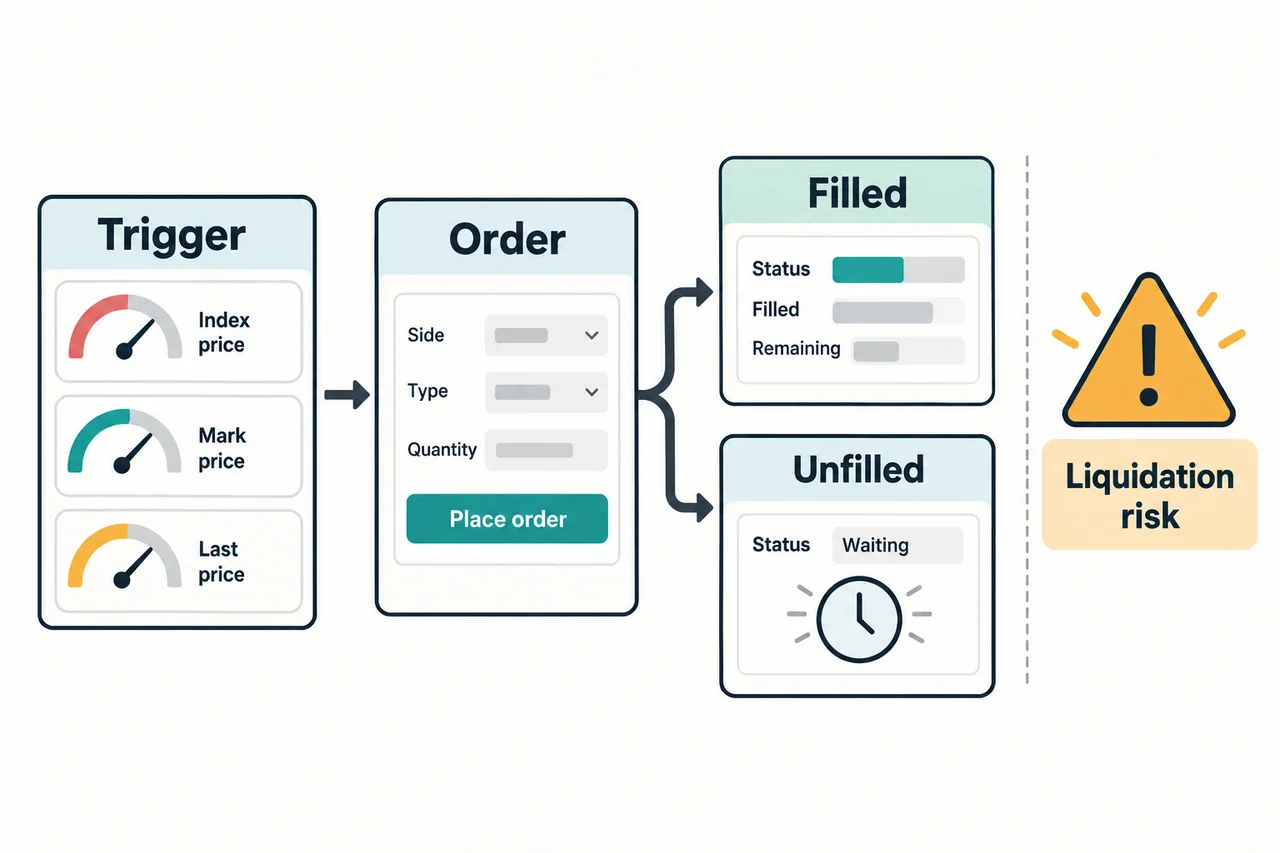
The trigger itself may fail due to price or position limits, insufficient margin, a contract trading suspension, or system factors. If a triggered limit order remains unfilled, the position may remain open; a market order may also fill at a price different from expected due to rapid price movements or insufficient liquidity. After setting TP/SL, check its active status, remaining quantity, and reference price. Do not present it as a feature that guarantees a maximum loss.
Check the mark price and maintenance margin status rather than relying on an estimated liquidation price
The official liquidation FAQ (revised 2026-08-27) explains that if the maintenance margin ratio falls to 100% or below, forced liquidation may occur because the account’s assets cannot cover the maintenance margin and potential liquidation costs. This does not mean that the required maintenance margin rate is 100%, or that liquidation waits until the entire principal is lost. Check the definitions and actual risk indicators that apply to your account mode and position tier.
Liquidation is assessed using the mark price, not the last traded price. The Estimated Liquidation Price shown on the screen is only an estimate, not the actual price at which a position is reduced or liquidated. An estimated liquidation price may not be provided for Cross accounts with multiple trading pairs or other position configurations. Do not interpret its absence as an absence of risk; check your margin status and the official calculator, or confirm the applicable conditions with customer support.
The liquidation process may include order cancellations, gradual position reductions, and further liquidations, and liquidation- or reduction-related costs may apply. Liquidation is not calculated simply as “a move of 1 ÷ leverage from the entry price.” You may lose all collateral, and additional margin, other positions, fees, funding, and maintenance margin tiers can affect the outcome.
Trading Fees, Funding Fees, and Reviewing Records After Closing
Futures trading fees are calculated based on the executed value specified in the contract details and the actual fee rate, not on margin. Opening and closing fees are calculated separately using the executed price and quantity. Calculation methods and fee currencies may differ between USDT contracts and coin-margined contracts. Check Fees and execution details for your logged-in account, product, and trading pair, and do not treat publicly listed example rates as your confirmed rate.
For example, if the execution value is 500 USDT, the assumed Taker rate is 0.05%, and the fee is charged in USDT, the fee for one side is 500 × 0.0005 = 0.25 USDT.
It is not 0.05 USDT, calculated by multiplying the 100 USDT margin by the rate.
If the opposite trade is also executed at the same execution value and rate, the total for both trades is 0.50 USDT. However, the actual amount will differ if the price, quantity, or Maker/Taker differs.
Funding, spread, slippage, liquidation costs, and rebates are excluded from this calculation.
Funding is separate from trading fees and may be paid or received depending on the settlement time, position direction, and rate. Settlement intervals are not the same for all contracts, so check the next settlement time, direction, and interval for the relevant contract in Funding rate / Countdown on the trading screen. For calculations and the currency actually charged, see the OKX fee guide; for settlement checks, see the OKX funding fee guide.
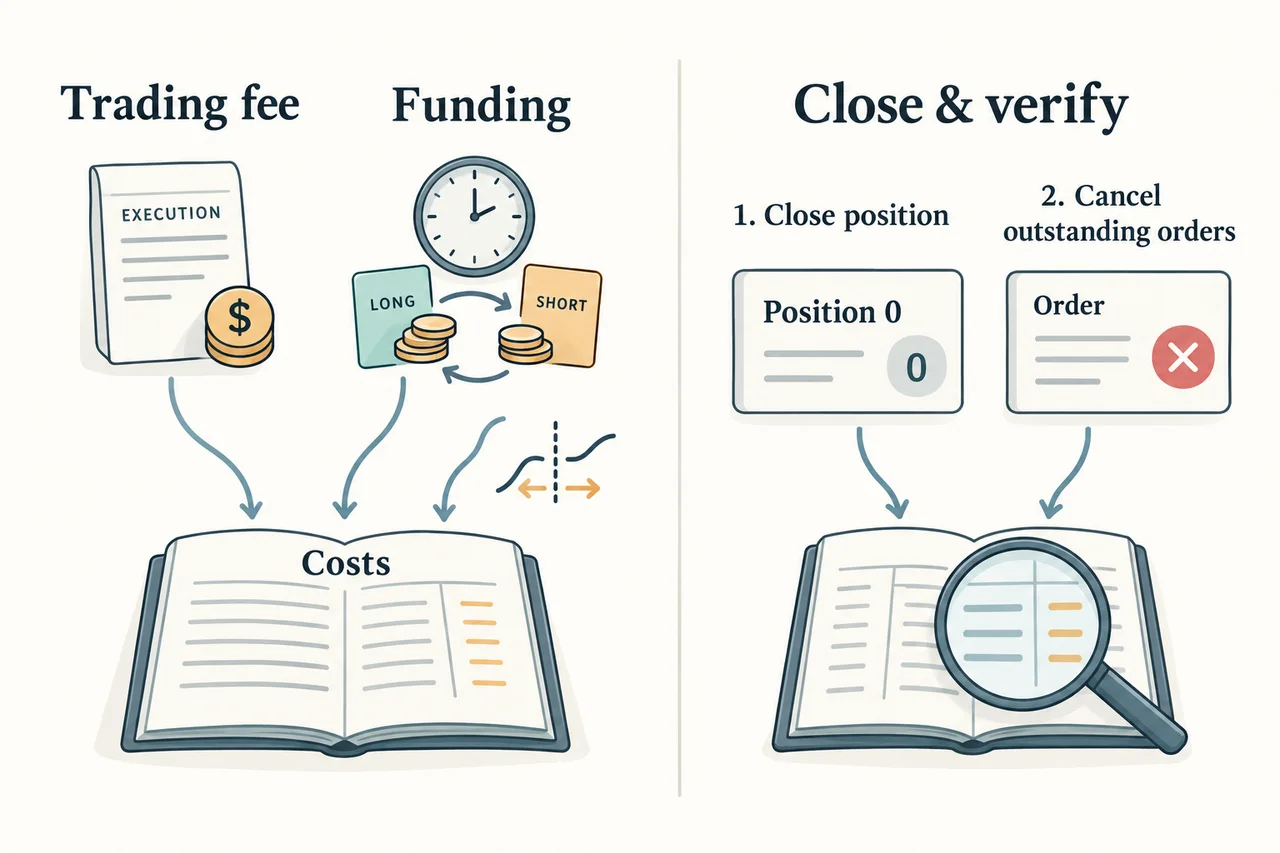
Submitting a closing order is not the same as fully closing a position. Check the remaining quantity under Positions and executions in Order history, then review separately whether any remaining entry orders, conditional orders, or TP/SL orders are needed. Do not cancel all orders indiscriminately; verify the relevant contract, direction, and quantity. Confirming a quantity of zero does not erase fees from past executions or funding that has already been settled.
Safe Troubleshooting Sequence
| Situation | What to check first |
|---|---|
| Menu or contract unavailable | Check regional and account eligibility and product availability with official support. Do not try to resolve this by using a workaround or another identity. |
| Balance available, but orders cannot be placed | Check Demo/Live, account location, collateral assets, margin tied up by existing orders, minimum quantity, and contract status. Do not try to resolve this immediately by making an additional deposit. |
| Position did not close at the stop-loss price | Check the selected trigger price basis and active status, submission result, order price, partial executions, and remaining quantity. |
| Orders remain after closing | Check the position and Open orders separately. Repeatedly placing orders before confirming the status may change your exposure. |
Frequently Asked Questions
Can anyone in Korea use OKX futures?
No. The OKX risk and compliance notice, reviewed on 2026-10-24, explains that derivatives-related services may be restricted in Korea. Access, KYC, and demo availability are separate from eligibility for actual products; check the applicable terms for your place of residence, contracting entity, and account, and consult official support. We do not provide instructions for circumventing restrictions.
With 100 USDT in margin and 5× leverage, are fees also based on 100 USDT?
No. If the simple notional position is 500 USDT, the fee is calculated using the execution value and actual rate. For a one-sided execution with an assumed rate of 0.05% and a fee charged in USDT, the fee is 500 × 0.0005 = 0.25 USDT. The actual amount varies according to contract specifications, executed quantity, price, and currency; funding and other costs are separate.
Do isolated margin or lower leverage prevent losses?
No. Isolated margin separates the scope of margin, and lower leverage does not prevent losses. You must also consider position size, additional margin, account mode, and maintenance margin requirements; the risk of losing all collateral and liquidation remains.
If I set TP/SL, will it always execute before liquidation?
There is no guarantee. Even after the trigger condition is met, order submission may fail due to price or position limits, insufficient margin, or system factors. Submitted orders may also remain unfilled, be partially filled, or execute at a different price than expected, so check the active status, quantity, and order result.
If I place a closing order, will all unfilled orders and funding also disappear?
No. You must check the remaining position quantity and unfilled or conditional orders separately. Fees from executions that have already occurred and funding that has been settled remain in the records. To determine whether the next funding applies, check the actual contract’s settlement conditions and your position status.
Official Sources and Scope of Review
- General Perpetual Futures Procedures — officially updated 2026-10-12
- Demo Futures Trading and Resetting — officially updated 2026-08-11
- Leverage, Margin, and Risk of Loss — officially updated 2026-08-11
- TP/SL Criteria and Failure Conditions — officially updated 2026-08-26
- Liquidation Criteria, Mark Price, and Estimated Liquidation Price — officially updated 2026-08-27
- Futures Fee Calculation Formula — officially updated 2026-08-26
- Regional Restrictions and Risk and Compliance Notice — document updated 2026-07-08
Region-specific pages among the sources support descriptions of features; they do not establish eligibility to use the services in Korea or any other region. This review is limited to consistency with publicly available official materials and the explanatory and hypothetical calculations; it did not test product permissions, individual fee rates, orders, deposits, or trading in an actual account. It does not provide investment, legal, or tax advice, or guarantee returns or execution of stop-loss orders.