
Affiliate disclosure: This article contains an OKX partner link. If you register or trade through it, the site operator may receive compensation. User benefits vary by account, region, VIP tier and campaign; check the sign-up page and My Rewards for the terms actually applied.
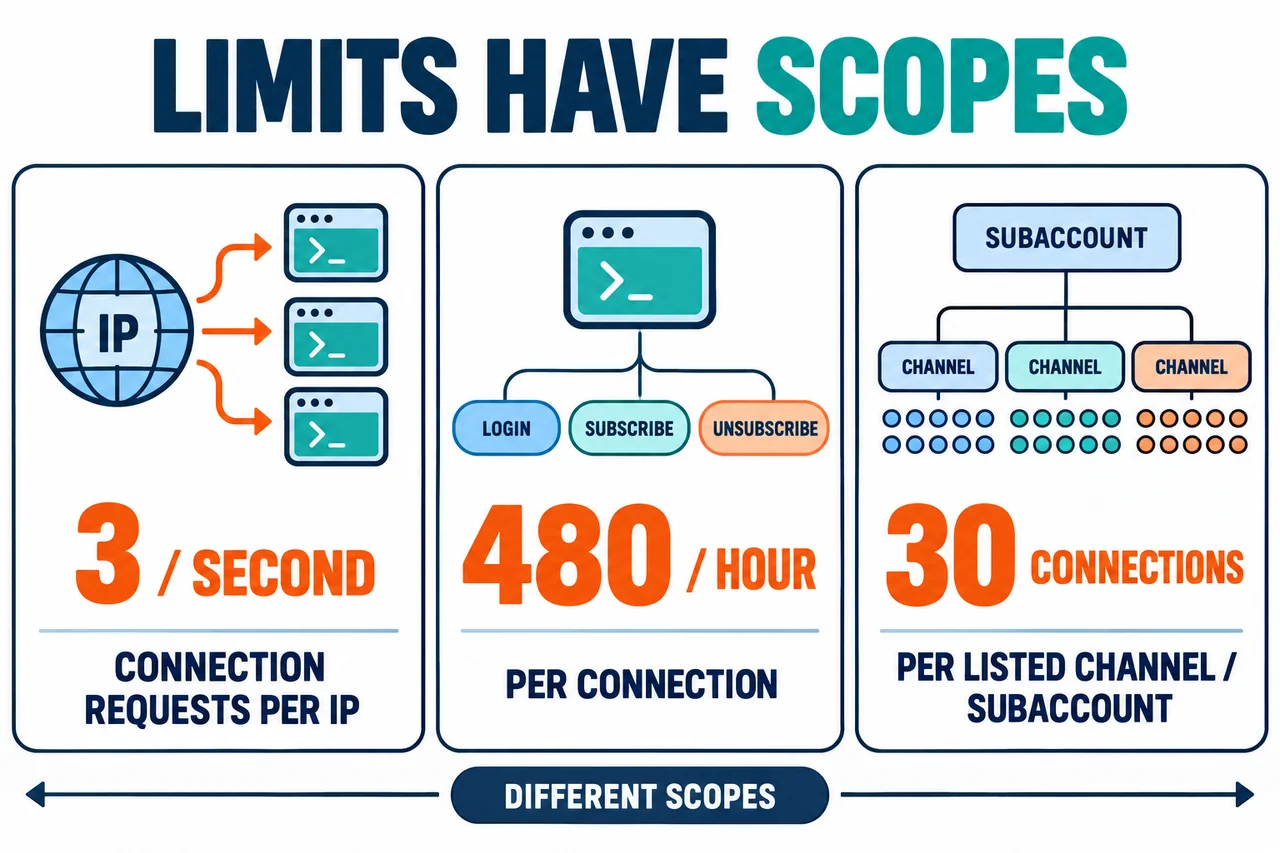
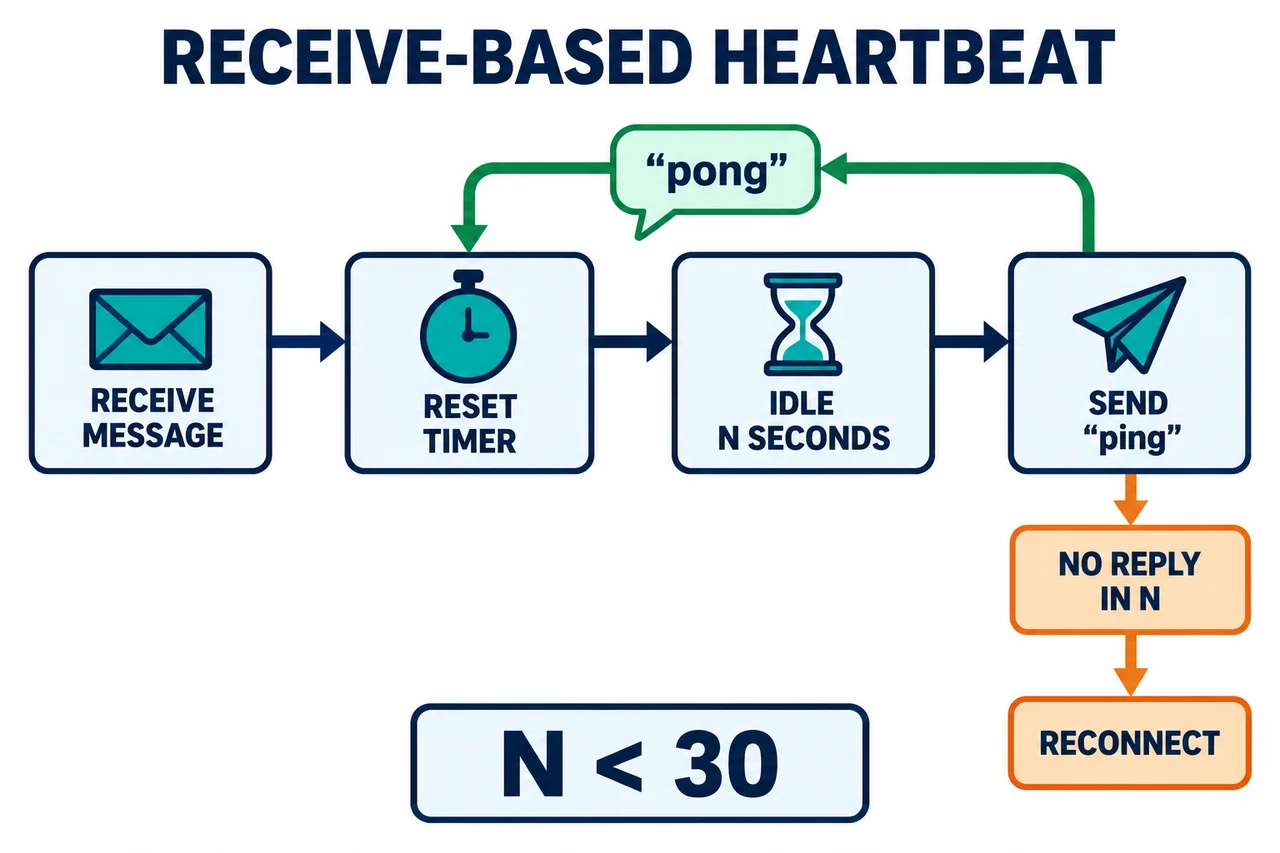
Direct answer: Separate Public, Private and Business services and live and Demo environments according to each OKX WebSocket channel specification. Authenticate channels that require login with the correct signature. Reset a timer N < 30 seconds on every response; after N seconds without a message, send the string ping and check the reply pong. Separately track the total of 480 login·subscribe·unsubscribe operations per connection per hour and 30 connections per subaccount and listed private channel.
API and trading risks: Do not expose your Secret Key or Passphrase in code, logs, screenshots, or public repositories. A successful WebSocket connection does not guarantee that an order strategy will be profitable or executed. Duplicate orders, stale position states, increased leverage, and liquidation may occur during reconnection. Suspend automated orders until state synchronization is complete, and validate the setup in the Demo environment first.
OKX WebSocket Key Limits at a Glance
| Item | Conditions and checks |
|---|---|
| New connection requests | Official limit: 3 times per second per IP Operational implication: Use backoff and random delays so that all processes do not reconnect simultaneously during an outage. |
| Login, subscribe, and unsubscribe | Official limit: 480 operations total per connection per hour Operational implication: Repeatedly sending the same subscription in a reconnection loop can quickly exhaust the limit. |
| Unresponsive connections | Official limit: May be automatically closed if there are no subscriptions or no data for more than 30 seconds Operational implication: Use an N-second timer shorter than 30 seconds to check ping·pong. |
| Connections to specific private channels | Official limit: 30 connections per sub-account and channel Operational implication: Prevent multiple processes from subscribing redundantly to channels subject to this limit, such as Orders, Account, and Positions. |
| Multiple subscriptions in one request | Official limit: Total length of multiple channel arguments must not exceed 64 KB Operational implication: Do not put an unlimited number of subscriptions in one message; track acknowledgments and failed items. |
These figures apply to different scopes. The limit of 3 times per second applies to connection requests per IP; 480 per hour is the total number of login, subscribe, and unsubscribe operations on one connection; and 30 is the limit on the number of active connections for each specific restricted channel. Do not mistake one of these figures for an overall WebSocket traffic limit. Separate rate limits for each order API also apply to order submissions.
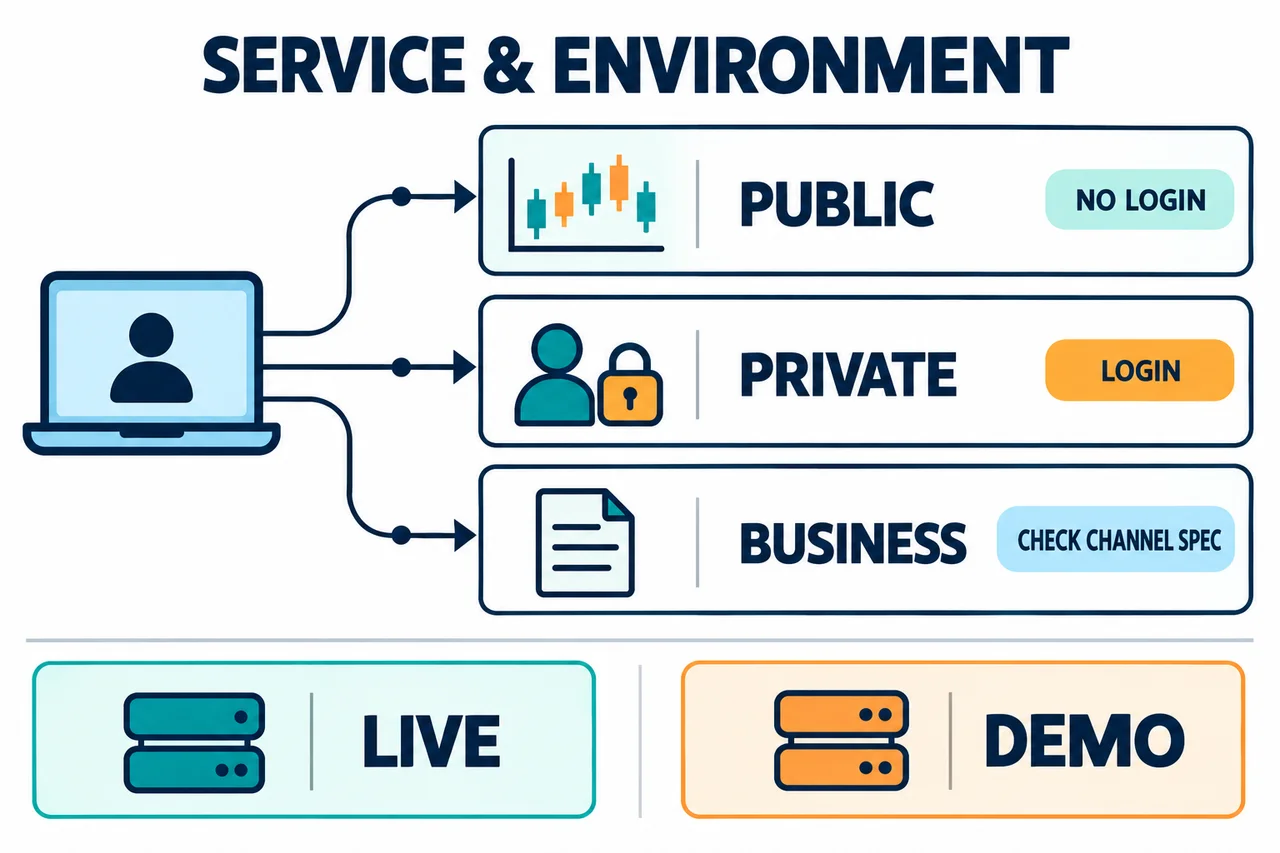
Choosing Public, Private, and Business services and environments
| Environment | Conditions and checks |
|---|---|
| Live trading | Service: Public Example of an official global endpoint: wss://ws.okx.com/ws/v5/publicAuthentication: No login required for public market data and order books |
| Live trading | Service: Private Example of an official global endpoint: wss://ws.okx.com/ws/v5/privateAuthentication: Login required for account, order, and position channels |
| Live trading | Service: Business Example of an official global endpoint: wss://ws.okx.com/ws/v5/businessAuthentication: Check the latest specifications for the channels you use |
| Demo | Service: Public Example of an official global endpoint: wss://wspap.okx.com/ws/v5/publicAuthentication: Keep the Demo environment and keys separate from live trading |
| Demo | Service: Private Example of an official global endpoint: wss://wspap.okx.com/ws/v5/privateAuthentication: Log in using a Demo-only API key |
| Demo | Service: Business Example of an official global endpoint: wss://wspap.okx.com/ws/v5/businessAuthentication: Verify supported features and channels individually |
Public channels include data that does not require authentication, such as tickers, order books, and mark prices. Private channels include account, order, and position data. There is no reason to send a secret key to access public channels. Conversely, if you connect to a Private endpoint and subscribe to account channels without receiving a successful login response, you will not receive valid data.
Regional note: The addresses above are examples verified in the global OKX API documentation on October 24, 2026. OKX advises using separate API domains and documentation according to the region where the account is registered. The official documentation directs US and AU accounts registered on app.okx.com to use the US and AU documentation and the us.okx.com API domain, and EU accounts registered on my.okx.com to use the EU documentation and the eea.okx.com API domain. Do not arbitrarily substitute these REST API domains as WebSocket addresses; check the WebSocket address in the documentation for the relevant region. This article does not cover VPNs or duplicate accounts as methods for bypassing regional restrictions.
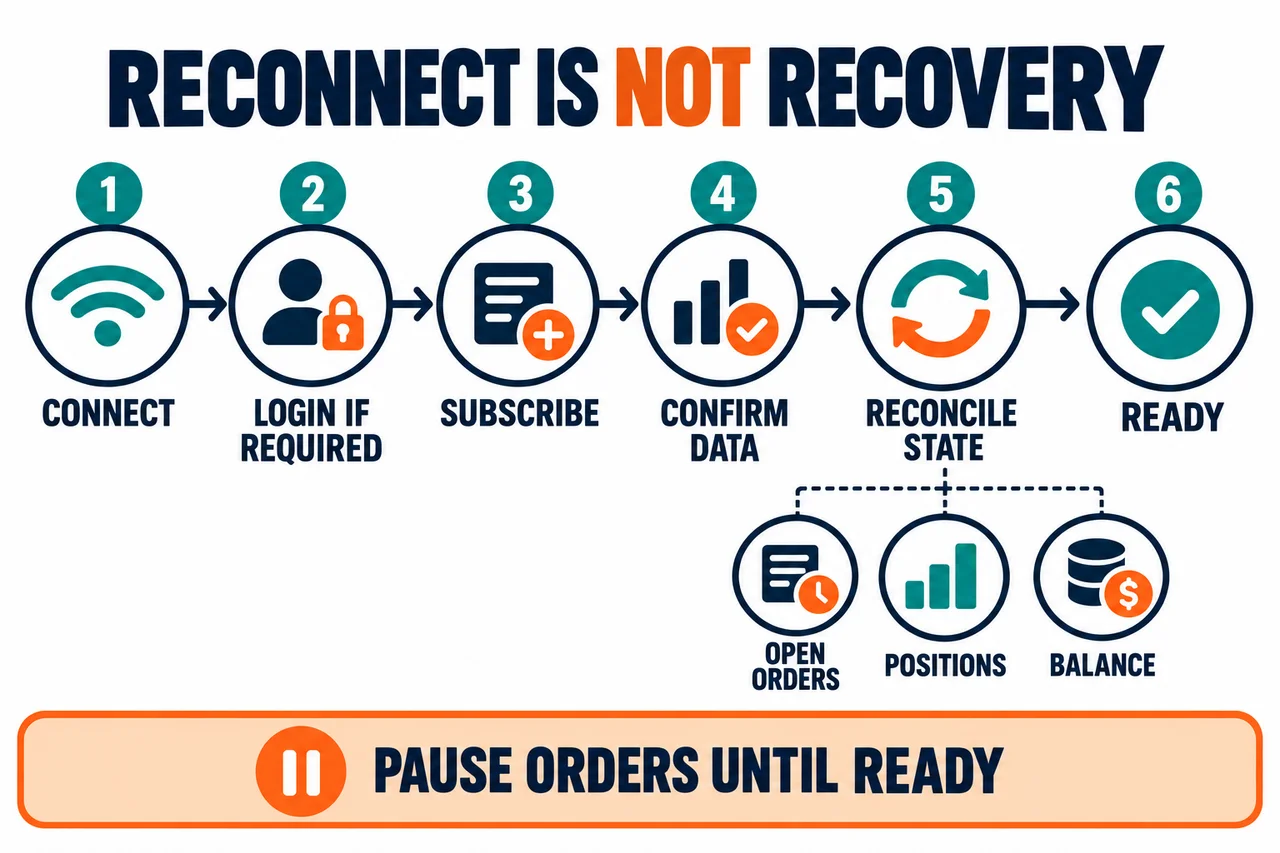
A safe sequence from connection to readiness
- Set the environment. Keep the configuration files, API keys, and WebSocket addresses for live trading and Demo separate.
- Check the channel specifications. Choose the service designated for the channel—Public, Private, or Business—and check the authentication requirements for Private channels. Do not send every channel to a Public endpoint just because it provides market data.
- Limit connection rates. Use a centralized reconnection queue to stay within the limit of 3 connection requests per second per IP.
- Log in when the channel requires authentication. This includes Private channels and the Business
orders-algochannel. Follow the channel specification rather than assuming that Business is unauthenticated. Send the login request with API Key, Passphrase, timestamp and sign, then verifycode: "0". - Subscribe only to the channels you need. Match the channel name and instType, instFamily, and instId to the latest specifications, and save the subscription acknowledgment.
- Start a receive timer. Set N to less than 30 seconds and reset the timer whenever a message is received.
- Synchronize state. Set the bot to ready only after reconciling the order, position, and balance snapshots with the stream.
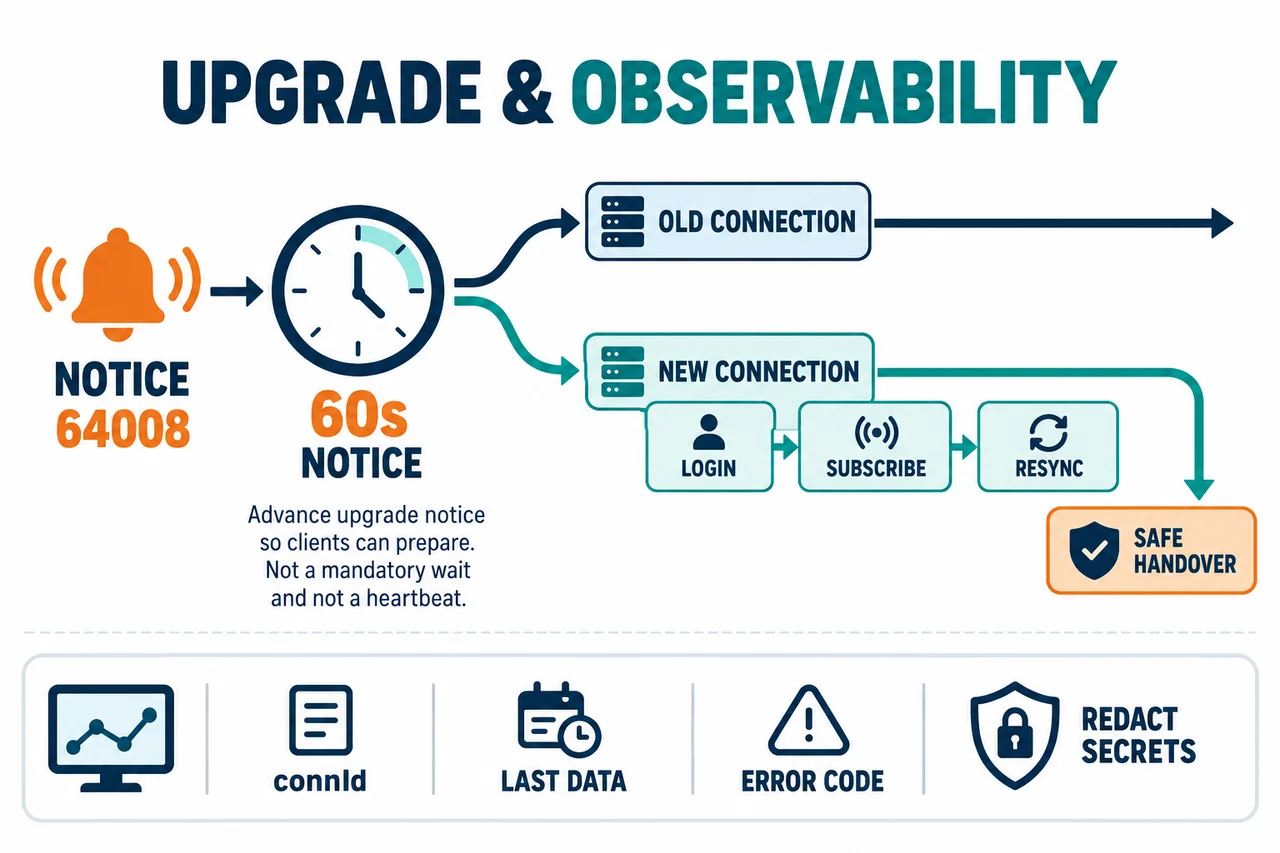
- Handle disconnect and upgrade notices. If the connection drops or a
64008notice arrives, recover in this order: establish a new connection, reauthenticate, resubscribe, and resynchronize.
DISCONNECTED → CONNECTING → AUTHENTICATING
→ SUBSCRIBING → RESYNCING → READY
Do not assume that the connection is ready to place orders just because the WebSocket is open. It is safer to switch to READY only after completing the required authentication and subscription checks, querying the current state as appropriate for each channel, and reconciling any data missed when the stream connected.
Private WebSocket Login Signature
OKX WebSocket login may look similar to REST order signing, but its input format is fixed. According to the official documentation, timestamp is a Unix Epoch string in seconds, and the method is always GET, while requestPath is always /users/self/verify.
preHash = timestamp + "GET" + "/users/self/verify"
sign = Base64(HMAC_SHA256(preHash, SecretKey))| Field | Requirements and checks |
|---|---|
| apiKey | Requirement: An API Key created for the relevant environment Common error: Mixing Demo and live-trading keys |
| passphrase | Requirement: The separate string set when creating the key Common error: Confusing it with the OKX login password |
| timestamp | Requirement: Unix Epoch string in seconds Common error: Sending a millisecond value as-is or reusing an old value |
| sign | Requirement: HMAC SHA256 of the fixed GET path, then Base64 Common error: Using a REST endpoint path, a lowercase method, or Hex output |
The login request expires 30 seconds after the timestamp. If the server times differ, check the difference using the REST server time API from OKX and generate a new timestamp. A successful response includes event: "login", code: "0" and connId, while an official failure example is event: "error", code: "60009", msg: "Login failed." Do not infer the cause from 60009 alone; check the environment, time, passphrase, signature, and key status one by one.
Key creation, least-privilege access, IP allowlisting, and the 14-day inactivity condition are covered in the OKX API Key Creation and Security Guide. Do not print the Secret Key to logs to troubleshoot login errors. Log only the length of the signing input string and, to a limited extent, its composition excluding secret values.
Note on API key inactivity: The official OKX documentation says that for WebSocket, only the login operation counts as API key usage; subscriptions or orders after login do not. If Trade or Withdraw permission keys that are not bound to an IP are subject to the 14-day inactivity condition, do not assume that data or orders passing over an open connection will refresh key activity. Maintain IP allowlisting and least-privilege access, and check the key status in the Security Center. Demo Trading API keys are exempt from this inactivity expiration condition.
Handling ping and pong to prevent 30-second disconnections
The OKX documentation says a connection may be closed automatically if no subscription is established or if no data is pushed for more than 30 seconds. The recommended approach is closer to a receive-based timer than to a simple fixed-interval ping.
- Restart an N-second timer whenever a response message is received. Keep N below 30.
- If no new message arrives for N seconds, send the string
pingrather than a JSON object. - Wait for the string
pongin response. - If no response arrives within the next N seconds, mark the connection as failed, close it, and reconnect.
Active channels can reduce unnecessary pings because data itself keeps arriving. By contrast, product or account channels with little trading activity may have long silent periods, so a timer is needed. Do not assume that automatic WebSocket ping frames from a library also implement the OKX string ping·pong exchange; verify it in actual receive logs.
Managing the limit of 480 requests per hour and 30 connections per channel
The combined number of login, subscribe, and unsubscribe requests on one connection is limited to 480 per hour. This is separate from the per-second connection limit, so distinguish cases where the connection remains open but subscription requests are rejected. Track whether the application has already subscribed to the same channel, and send only the final set of required subscriptions once after reconnecting.
In addition, the Orders, Account, Positions, Balance and positions, Position risk warning, and Account greeks channels are subject to a limit of 30 WebSocket connections per specific channel for each subaccount. Subscribing to the same channel with multiple arguments on one connection counts as one connection for that channel, but different channels, such as Orders and Account, are counted separately. When making a new subscription, record connCount from the channel-conn-count event, and if channel-conn-count-error arrives, look for duplicate consumers instead of creating more connections.
The OKX documentation states that order submissions, modifications, and cancellations via WebSocket are not affected by this change to the 30-connection channel limit. However, endpoint-specific rate limits for order operations still apply. Some order limits are shared between REST and WebSocket, so check the specifications for each order API separately.
Check beyond the successful subscription response: When the connection limit is exceeded, a channel-conn-count-error may arrive after a standard successful subscription response, and the subscription may be terminated. The official documentation says that new subscriptions are generally rejected, but existing connections may also be disconnected in exceptional cases. Track subscription status and limit events by connId, and do not treat a single ACK as a guarantee of continued data delivery.
Preventing data gaps and duplicate orders on reconnect
More dangerous than disconnecting and reconnecting is continuing to trust the state from the period when the connection was down. If you use private order and position streams, briefly pause automatic order placement immediately after reconnecting, then query open orders, positions, and balances again and compare them with local state.
- Control reconnections using exponential backoff, random delays, and a maximum wait limit.
- Use a single coordinator to prevent multiple workers from reconnecting simultaneously from one IP.
- Do not send Private subscriptions before login succeeds.
- Distinguish subscription confirmation responses from channel-specific receive status. For channels that push only when there are changes, such as order channels, do not conclude that a subscription has failed just because the channel is quiet.
- Check for duplicates and gaps according to each channel's timestamp, sequence, and order ID rules.
- Do not resume order creation, modification, or cancellation while a state mismatch remains.
- For an order with no response, use its unique client order ID and query the order to confirm whether it was accepted before deciding whether to retry. Do not resend the same order merely because the connection has recovered.
OKX may send an event: "notice", code: "64008" notice 60 seconds before a WebSocket service upgrade. In this case, do not wait for the existing connection to drop. Create a new connection and complete login, subscription, and state synchronization before switching over safely. The notice is currently specified as supported on Public and Private WebSocket.
If signature, timestamp, and environment errors occur together, refer to the OKX API Error 50113 and 50102 Troubleshooting Guide. If you have not yet validated the leverage and liquidation structure of automated orders, it is safer to read the OKX Beginner's Guide to Futures Trading first and test the entire recovery flow in Demo.
Initial data for the Orders channel: The official Orders channel specification states that it does not push data when you first subscribe, and only pushes data when a new order is placed or an order changes. Therefore, do not expect all existing open orders to be sent automatically after subscription is confirmed. The following is a recovery procedure for AKEYX; it does not mean that the platform provides the same replay functionality for every channel.
- Stop automated orders. After completing login and confirming the subscription on the recovery connection, temporarily store incoming updates.
- Use the official REST API to retrieve current open orders, positions, and balances. Orders missing from the open orders list may have been canceled or filled, so check order details and history as needed.
- Deduplicate by comparing order IDs, update times, cumulative fill quantities, and other fields according to the relevant channel specification. Do not assume that all channels use the same sequence or provide an initial snapshot.
- If the order of the REST response and stored events is ambiguous, query again to verify consistency. If discrepancies remain or it is unclear whether an order was accepted, do not switch to
READY.
Causes and first actions by symptom
| Symptom | Conditions and items to check |
|---|---|
| Disconnects about every 30 seconds | Likely cause: Failure to handle ping·pong during idle periods Evidence to check first: Time of last message received, ping string, and pong response Avoid: Immediate reconnection attempts without limit |
| 60009 Login failed | Likely cause: Mismatch in environment, timestamp, Passphrase, or signature Evidence to check first: Environment where the key was created, time in seconds, and fixed GET path Avoid: Printing the Secret Key in logs |
| No subscription confirmation received | Likely cause: Incorrect service, channel, or arguments, or limit exceeded Evidence to check first: Public/Private address, error code·msg, and request size Avoid: Repeating the same subscribe request indefinitely |
| channel-conn-count-error | Likely cause: Exceeding 30 connections for a channel subject to the limit Evidence to check first: connId list by subaccount and channel Avoid: Continuously adding new processes |
| Data gap during upgrade | Likely cause: Ignoring the 64008 notice Evidence to check first: Time the notice was received and time the new connection was ready Avoid: Starting the connection only after the old one has closed |
| Duplicate orders after reconnection | Likely cause: Local state not synchronized or unlimited retries Evidence to check first: Client order ID, open orders, and position snapshot Avoid: Resuming automated orders before READY |
Pre-operation checklist
- □ Have you opened the official API documentation for your account region and environment?
- □ Have you separated the Public·Private·Business addresses and live trading·Demo settings?
- □ Do you centrally manage the limit of 3 connection requests per second per IP?
- □ Is the WebSocket login timestamp in seconds and sent within 30 seconds?
- □ Are secret keys and Passphrases excluded from logs and error-tracking services?
- □ Do you monitor the counter for 480 operations per hour per connection and the 64KB subscription size?
- □ Do you record connId and connCount by subaccount for channels subject to the limit?
- □ Do you have a receive timer shorter than 30 seconds and handling for ping·pong failures?
- □ Do you handle 64008 notices, network closures, and authentication failures as distinct states?
- □ Do you block orders until snapshot·stream synchronization is complete after reconnection?
For account defense settings and key-leak response, also see the OKX safety and account security guide. Connection stability and security are separate concerns, and high uptime does not make risky orders safe.
Frequently asked questions
Do I need an API key just to receive market data?
Public channels such as tickers and order books generally do not require authentication. Check the Public·Business service address in the specification for the actual channel, and do not send a secret key. Private channels such as account, order, and position channels require login.
Should I send ping exactly every 30 seconds?
The official guidance is to set N to less than 30 seconds, reset the timer whenever a message is received, and send the string ping if there is no response for N seconds. If pong does not arrive within the next N seconds, handle it as an error or reconnect.
Is the limit of 480 per hour a limit on market data messages?
No. It applies to the total number of login·subscribe·unsubscribe requests per connection. It is separate from the number of market data items sent by the server and the rate limits for order endpoints.
Does the 30-connection limit apply to all WebSockets?
No. It is calculated by subaccount and channel for specific private channels listed in the official documentation, such as Orders·Account·Positions·Balance and positions·Position risk warning·Account greeks. Check the connCount events for each channel.
If it works well in Demo, can I connect to live trading in the same way?
Demo and live trading must use separate endpoints and API keys, and support for some features may also differ. Even if you copy the settings, revalidate order size, account mode, permissions, regional domain, and recovery procedures under live trading conditions.
Does using OKDCC increase WebSocket limits?
No. Referral codes are unrelated to WebSocket connection, subscription, or order rate limits, or API stability. Fee rebates are not automatically or unconditionally applied, and availability and terms may vary by account, region, VIP status, and campaign. Check the actual rate on the page before signing up and in My Rewards after signing up.
Official references and review date
- OKX API V5: API Key Security — Conditions under which only WebSocket login counts as key use, and the 14-day inactivity rule
- OKX API V5: WebSocket Overview — Connection methods and Public·Private distinction
- OKX API V5: WebSocket Connect — 3 connection requests per second per IP; 480 login·subscribe·unsubscribe operations per connection per hour; receive-based N < 30 seconds and string ping·pong
- OKX API V5: Connection Count Limit — Channels subject to the limit, 30 per subaccount·channel, connCount events
- OKX API V5: WebSocket Login — Timestamp in seconds, fixed signature path, 30-second expiration, 60009
- OKX API V5: Subscribe — Public·private channels, subscription arguments, and 64KB requirement
- OKX API V5: Notification — 64008 notice 60 seconds before service upgrade
- OKX API V5: Production Trading Services — Live trading REST·WebSocket addresses
- OKX API V5: Demo Trading Services — Demo-only addresses·keys and supported scope
- OKX API V5: Order Channel — No initial data push upon the first subscription; updates are sent for new or changed orders.
- OKX API V5: Algo Orders Channel —
orders-algo·/ws/v5/business· login
Last reviewed: October 25, 2026. Connection addresses, regional domains, channel lists, rate and connection limits, and Demo-supported features may change. Recheck the OKX official documentation for your account’s region at the time of execution, and apply the reconnection and status synchronization procedures in AKEYX as analytical guidance to reduce operational risk.