
Affiliate disclosure: This article contains an OKX partner link. If you register or trade through it, the site operator may receive compensation. User benefits vary by account, region, VIP tier and campaign; check the sign-up page and My Rewards for the terms actually applied.
OKX API error 50113 Invalid signature means that the server’s recalculated signature does not match the request’s OK-ACCESS-SIGN value. Build timestamp + method + requestPath + body from exactly the values being transmitted, then apply HMAC SHA256 and Base64 encoding. If 50102 or 50101 also occurs, separately check UTC time and the live/Demo environment.
Security and trading risks: To fix the error, do not paste your Secret Key or Passphrase into logs, screenshots, Git repositories, or public posts asking for help. If a key with Trade permission is exposed, unauthorized orders, increased leverage, accumulated fees, and liquidation may occur even if it does not have withdrawal permission. Before retrying in live trading, check open orders and positions, order size, account mode, and environment.
OKX Quick diagnostic table for API error codes
| Error code | Conditions and items to check |
|---|---|
| 50113 | Official message: Invalid signature First item to check: Whether the string before signing matches the actual request Safe first action: Before changing keys, compare timestamp, method, path, and body individually |
| 50102 | Official message: Timestamp request expired First item to check: Difference between UTC and server time Safe first action: GET /api/v5/public/timeCheck synchronization with |
| 50101 | Official message: APIKey does not match current environment First item to check: Live-trading and Demo keys, and the request environment Safe first action: Check with a Demo-only key and x-simulated-trading: 1 verify |
| 50105 | Official message: OK-ACCESS-PASSPHRASE incorrect First item to check: The Passphrase set when the key was created Safe first action: If it is lost, create a new key instead of repeatedly guessing |
| 50110 | Official message: IP not in API key whitelist First item to check: The server's actual public IP Safe first action: Do not disable IP restrictions; compare the allowlist with the outgoing IP |
| 50120 | Official message: API key has no permission First item to check: The requested function and permissions such as Read and Trade Safe first action: Add only the minimum permissions required |
| 50011 | Official message: Rate limit reached First item to check: Call limits for each endpoint Safe first action: Apply backoff, a queue, and a retry limit |
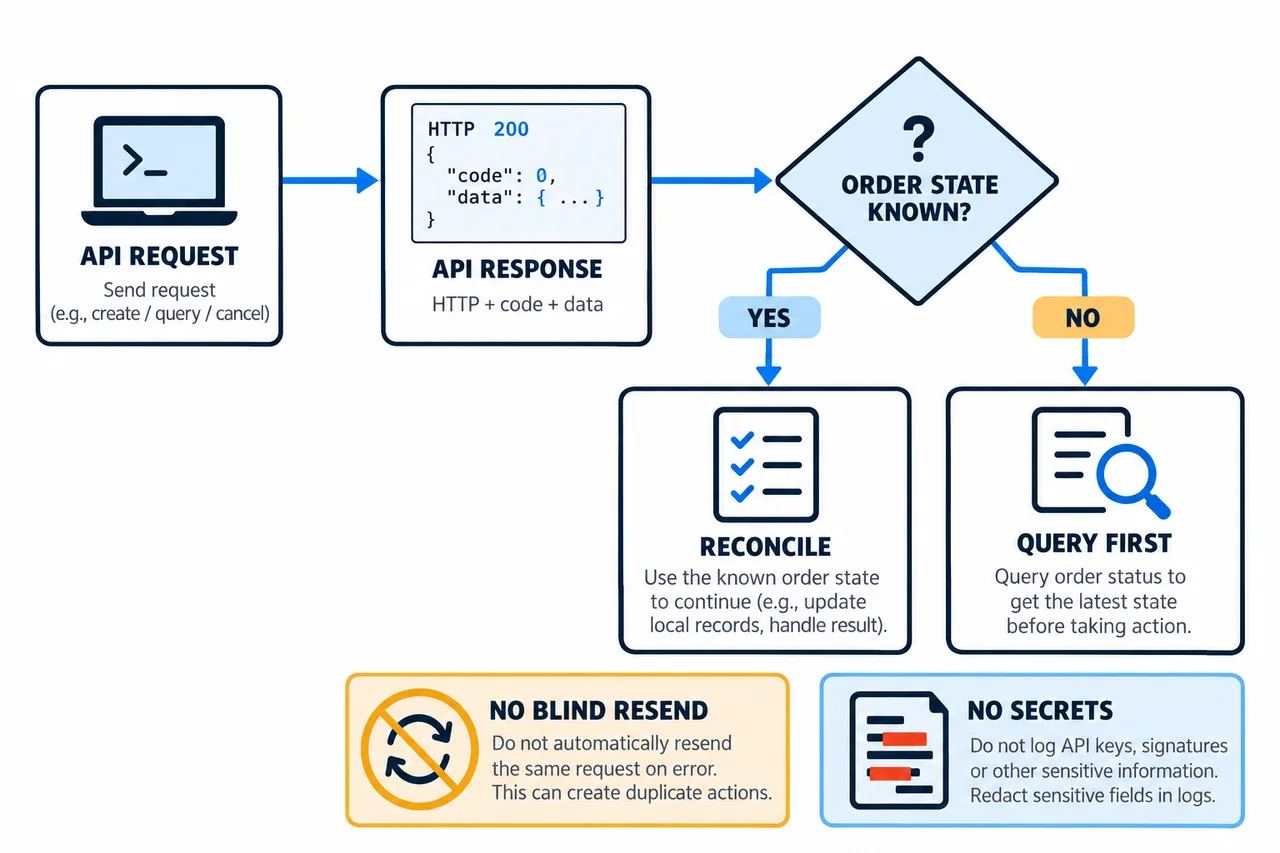
OKX Some application errors in the official error table are returned with HTTP 200. Therefore, do not treat a request as successful based only on the HTTP status; also check the response's codeand msg. The resolution order in the table is a diagnostic sequence compiled by AKEYX based on official messages and authentication rules; it does not mean that you should expose secret values.
Other errors to distinguish: 50119 API key doesn’t existDo not assume this error means the key has been revoked or deleted; check the account's registration region and the key's association with the request domain and subaccount. 50004 API endpoint request timeoutdoes not confirm either success or failure, so do not resend the same order before checking its result. Distinguish these cases based on the applicable conditions in the official error table and API FAQ.
Use the API error code finder to review checks for supported error codes, connection types and live/Demo environments. This selection-based guide does not ask for API keys, Secrets, Passphrases or raw logs, send actual API requests, or confirm account status or the cause of an error.
What does 50113 Invalid signature mean?
50113 does not mean “the API key is definitely wrong.” It means the signature calculated by OKX using the same request information does not match the signature sent by the client. Even with the same Secret Key, changing any one of the timestamp, HTTP method, query string, request path, or JSON body will produce a completely different signature.
If you first need to review the basics of key creation, permissions, and IP restrictions, see OKX API Key Creation and Security Guide. This article focuses specifically on the search intent of users who have already created a key but whose authenticated requests are failing.
Official signing formula and four input values
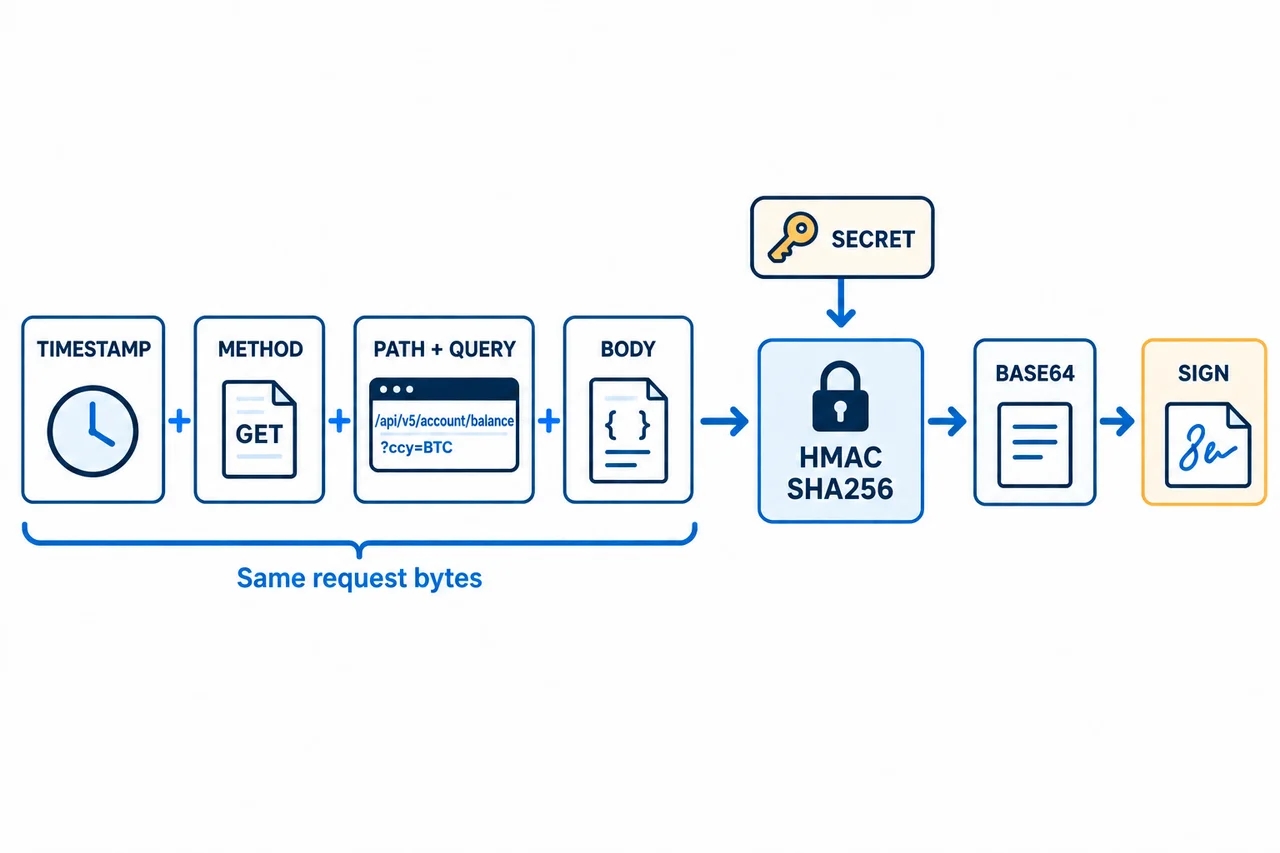
OKX The signing sequence in the REST authentication documentation is as follows.
preHash = timestamp + method + requestPath + body
signature = Base64(HMAC_SHA256(preHash, SecretKey))| Input value | Conditions and items to check |
|---|---|
| timestamp | Official condition: The same millisecond-precision ISO 8601 UTC string used in the OK-ACCESS-TIMESTAMP headerCommon discrepancies: Local time zone, missing milliseconds, regenerating the time after signing How to verify: Compare the strings used in the header and preHash by length and hash, without exposing secret values |
| method | Official condition: Uppercase, such as GET or POST Common discrepancies: get, leading or trailing spacesHow to verify: Force uppercase immediately before sending |
| requestPath | Official condition: Path excluding the domain, including the GET query Common discrepancies: Including the host, differences in query order or encoding, trailing slash How to verify: Compare against the path actually sent by the HTTP client |
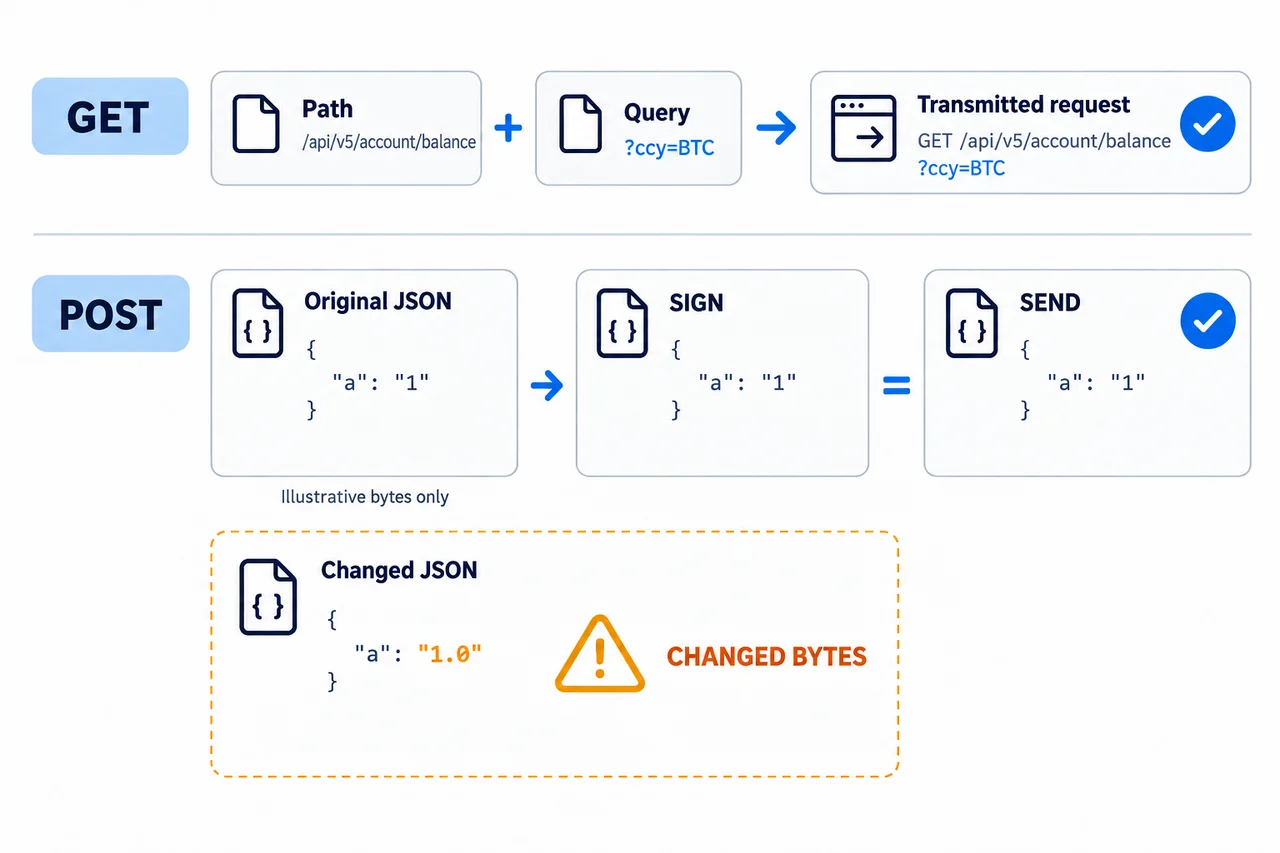
| body | Official condition: Usually an empty string for GET; the actual JSON string sent for POST Common discrepancies: Reserializing JSON after signing; changes to spaces, key order, or number formatting How to verify: Check whether the signed body matches the transmitted bytes |
GET request example
timestamp = "2026-08-25T00:00:00.000Z"
method = "GET"
requestPath = "/api/v5/account/balance?ccy=BTC"
body = ""
preHash = timestamp + method + requestPath + body
Include ?ccy=BTC in requestPath when it is sent in the actual GET request. Omitting it from the signature, or changing query order or encoding after signing, can cause 50113. Exclude the host, such as https://www.okx.com, from requestPath.
POST request example
body = '{"instId":"BTC-USDT","tdMode":"cash","side":"buy","ordType":"limit","px":"10000","sz":"0.001"}'
preHash = timestamp + "POST" + "/api/v5/trade/order" + body
AKEYX Diagnostic principle: Send the exact JSON string used for signing. If the object is reserialized and its spacing, key order, or number representation changes, the body seen by the server may differ from the signing input. The example is for illustrating the format and is not a recommendation for actual order prices or quantities.
Resolution steps for 50113: 8 checks before reissuing a key
- Stop live-trading requests. Pause the queue to prevent automatic retries from causing duplicate orders or rate limits.
- Separate error responses. Along with the HTTP status
code,msg, record only the endpoint and time of occurrence. - Generate the timestamp only once. Use the same value in the header and preHash.
- Use uppercase methods consistently. Check that GET·POST matches the method actually sent.
- Compare the final requestPath. Include the GET query string, encoding, and order, but exclude the host.
- Keep the POST body fixed. Send the signed JSON string without modification.
- Check the HMAC SHA256 and Base64 sequence. Avoid confusing library output formats, such as Base64-encoding a hexadecimal string again.
- If it still fails, isolate the environment and credentials. In the following steps, check the Demo·live-trading keys, regional domain, Passphrase, IP, and permissions.
Never include the Secret Key or Passphrase in debugging logs. If needed, instead of the preHash itself, record only the length, the length of each request component, and one-way hashes of the requestPath and body with secret values excluded, in restricted security logs.
Resolving 50102 Timestamp request expired
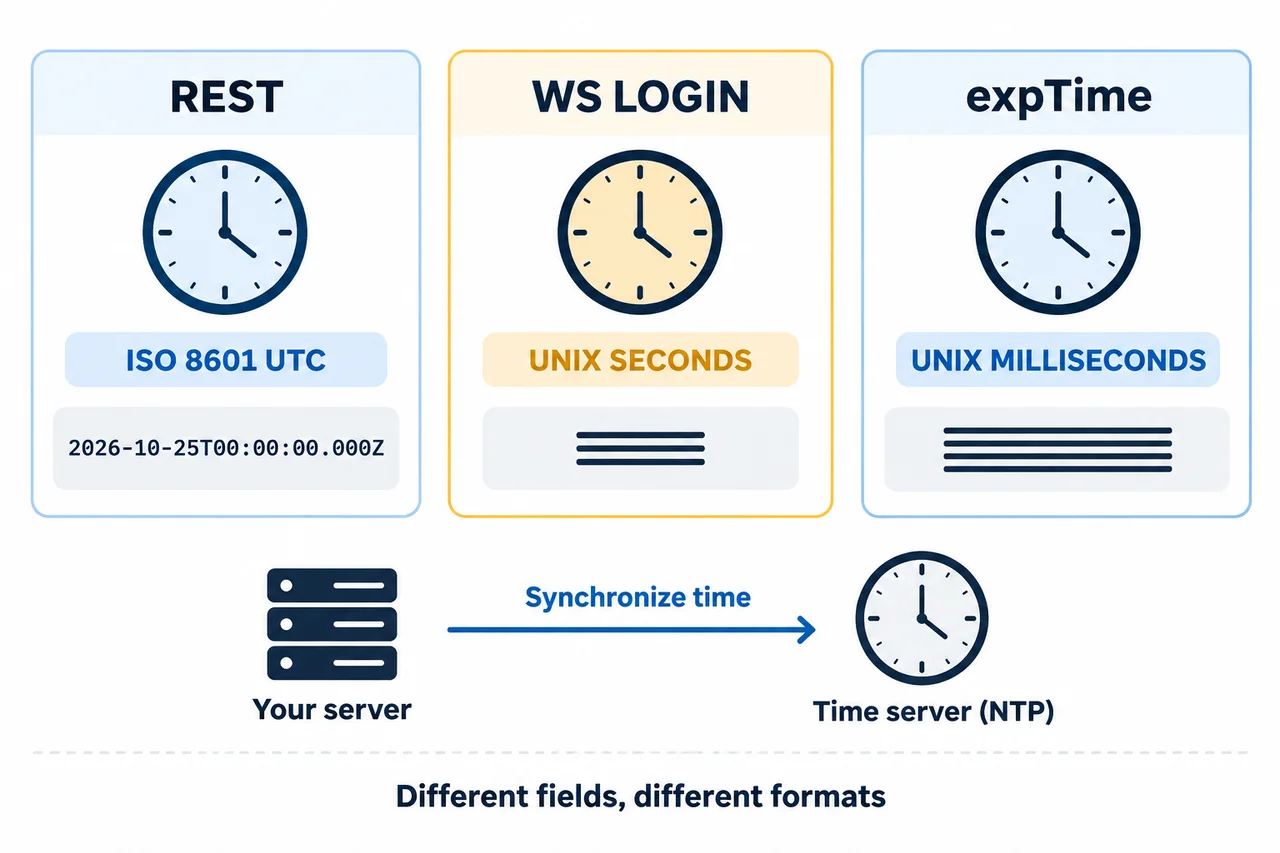
OKX The official documentation OK-ACCESS-TIMESTAMPexplains that it should be sent in ISO 8601 UTC format with millisecond precision, and that requests with a difference of more than 30 seconds from server time are rejected. Mistaking a local time-zone offset for UTC is a common cause; before placing orders, it recommends using GET /api/v5/public/timeto check synchronization with server time.
- Check the time synchronization status of the operating system and container.
- Check that the UTC timestamp ends with
Z. - Check that it is not sent with an outdated timestamp after waiting too long in the request queue.
- Check that the retry module does not change only the timestamp header after signing.
- Even if you apply a server-time correction, do not accumulate it with every request.
Do not interchange time fields. REST OK-ACCESS-TIMESTAMPuses an ISO 8601 UTC string with millisecond precision, while the timestamp for WebSocket login is Unix seconds. The optional header for supported order and amendment requests expTimeis an expiration time in Unix milliseconds and does not replace the authentication timestamp or server-time synchronization. The fixed date code above is for illustrating the format; do not reuse it in actual requests. Check REST authentication and the expTime support scope separately.
50101: Live-trading and Demo environments and regional API domains
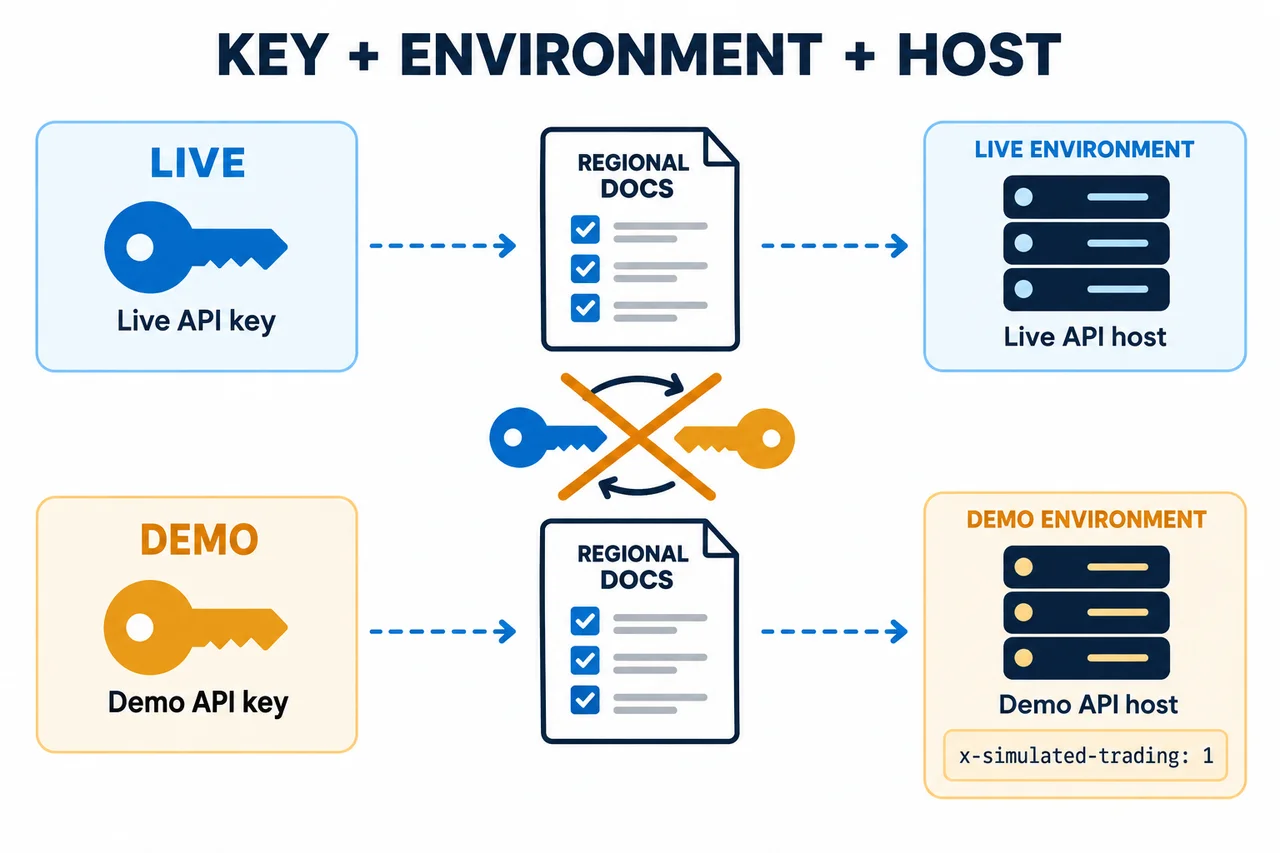
50101 is returned when the API key does not match the current request environment. OKX The official documentation instructs users to create a separate Demo API key in Demo Trading and add x-simulated-trading: 1to Demo request headers. Do not use a live-trading key for Demo requests or vice versa.
| Item to check | Conditions and checks |
|---|---|
| API key | Live trading: Key created from the live-trading API menu Demo Trading: Key created through the Demo Trading-only path Preventing failures: Separate key names and environment-variable prefixes |
| Additional header | Live trading: Do not add Demo headers arbitrarily Demo Trading: x-simulated-trading: 1Preventing failures: Separate shared HTTP clients by environment |
| Order validation | Live trading: Small amounts·minimum permissions·loss limits Demo Trading: Test order flows and parameters Preventing failures: Do not assume Demo results will translate into live-trading profits |
| Regional domain | Live trading·Demo Trading: Use the official API domain for the account’s registered region Preventing failures: For accounts registered in the US·AU or EU, check the official guidance on regional domains |
The OKX API documentation reviewed on October 25, 2026 maps US/AU accounts registered at app.okx.com to the API domain us.okx.com, and EU accounts registered at my.okx.com to eea.okx.com. Use the corresponding official regional documentation and the domain specified for your account; do not bypass regional restrictions.
Check 50119 and SDKs as well: Even if the key exists, the connection may fail if the account’s registered region does not match the API host or if a third-party tool does not support regional domains. Do not assume the key was deleted based on 50119 alone, and do not randomly try hosts in other regions. Check the primary or sub-account that issued the key, the official documentation for the region, the SDK’s live-trading and Demo settings, and the actual request headers together. In the global documentation, the REST hosts for live trading and Demo may be the same, so do not determine the environment based on the hostname alone.
50105·50110·50120: Passphrase, IP, and permission issues
50105 Passphrase incorrect
OK-ACCESS-PASSPHRASEis OKX a separate string chosen by the user when creating an API key, not a login password. The official FAQ states that a forgotten Passphrase cannot be recovered. Check capitalization, spaces, and environment-variable mapping, but do not repeatedly guess a value you cannot remember; revoke the existing key and create a new one.
50110 IP whitelist
means that the outbound IP shown in the error message is not on the API key’s allowlist. If the server routes through NAT, a proxy, or a cloud gateway, check the actual public outbound IP shown at OKX, not the application’s internal IP. Do not disable all IP restrictions or allow an arbitrarily broad network range just to eliminate the error.
50120 permission
means that the API key does not have permission to use the requested feature. Match the purpose to the permission—for example, Read for balance checks and Trade for order placement or cancellation. Enabling Withdraw as well in response to a single error is not a solution. Account-wide protection settings are covered in the OKX Safety and Account Security Guide.
Resolving 50011 Rate limit reached
OKX explains that different rate limits apply to each endpoint and that 50011 is returned when a limit is exceeded. The basis for the limit can also vary by request type, such as by IP for public REST and by user ID for private REST. Do not retry indefinitely with a fixed delay; design requests according to the limits in the endpoint documentation.
- Do not mistake 429 or 50011 for a successful response.
- Apply exponential backoff and randomized delays.
- Set limits on the number of retries and total wait time.
- Cache repeated data lookups and consolidate duplicate polling.
- For order-creation retries, use a unique client order ID and a status-check procedure.
- Separate the roles of WebSocket subscriptions and REST polling.
Do not assume that separating REST and WebSocket increases the limits. The official documentation states that the applicable limits for creating, amending, and canceling orders are shared between REST and WebSocket, while creation, amendment, and cancellation may each have independent limits. Calculate conditions by product, user, and endpoint in one place, and for 50011 handle the response formats listed in the official table, such as HTTP 200 or 429. Retry intervals and attempt limits are operational recommendations from AKEYX, not a way to increase official limits.
50004 Timeout: Check the order result before resending
50004 or a communication loss does not prove that the request was not processed. Stop the automated order queue and preserve the request ID andclOrdId·ordIdand the time of occurrence from when it was sent, without secret values, then cross-check the official order lookup and order and fill history, and, if necessary, positions and balances. While the result is unclear, do not submit the same order with a new ID or repeat the same request indefinitely. The official 50004 error definition explicitly instructs you to verify the actual request result.
Check the response in three stages: HTTP status → top-level code·msg → per order data[].sCode·sMsgand interpret the result fields for the endpoint. Acceptance and successful processing of an order request are different from execution completion, so code: "0"or the presence of an order ID does not mean that the order was filled. Check the result of each item separately for multiple orders.
clOrdId is not a guarantee of unlimited duplicate prevention. The official general order specification explains that it must be unique among an account's current open and partially filled orders, that the same value may be reused after an order is closed, and that uniqueness across all historical orders is not enforced. If the same value has been used for multiple orders, an order detail lookup may return only the latest matching item. Where possible, cross-check the returned ordId together with the timestamp and history, and do not assume that retries are safe based solely on a deduplication key. Check the general order response and clOrdId requirements.
Separating causes by failure scenario
| Symptom | Conditions and items to check |
|---|---|
| Only GET returns 50113 | Likely cause: Missing, misordered, or incorrectly encoded query string Evidence to check: Compare the final transmitted URL with the signed path Avoid: Regenerating the key indiscriminately |
| Only POST returns 50113 | Likely cause: JSON body changed after signing Evidence to check: Compare the hash of the transmitted body with the hash of the signed body Avoid: Printing the Secret in logs |
| Intermittent 50102 | Likely cause: Queue delays or use of an old timestamp during retries Evidence to check: Difference between creation time and actual transmission time Avoid: Assuming the tolerance was arbitrarily increased |
| 50101 only in Demo | Likely cause: Mixing keys, headers, or environments Evidence to check: Where the key was created and the x-simulated-tradingAvoid: Repeated requests with a live-trading key |
| 50110 after deployment | Likely cause: Change in outbound public IP Evidence to check: The deployment infrastructure's egress IP Avoid: Removing all IP restrictions |
| HTTP 200 but request fails | Likely cause: Response code is not 0 Evidence to check: code·msg parsingAvoid: Treating HTTP status alone as proof of success |
Safe debugging log checklist
- □ Did you record only the error code, HTTP status, endpoint, and UTC timestamp?
- □ Did you record only the last few characters or internal key name instead of the full API Key?
- □ Did you completely exclude the Secret Key and Passphrase?
- □ Did you check whether requestPath and body contain personal information, balances, or order information?
- □ Did you compare using component lengths and a one-way hash instead of the full preHash?
- □ Did you restrict log access permissions and retention period?
- □ Did you check open orders and positions before retrying live trades?
If you do not yet understand the leverage, margin, and liquidation risks of automated trading, first read OKX the Beginner's Guide to Futures Trading and test the order flow in the Demo environment. Successful API authentication does not guarantee that a strategy will be profitable or that orders are safe.
If you suspect a key leak or unexpected orders
- Immediately revoke the affected API key.
- Stop the bot and retry queue.
- Check open orders, positions, internal transfers, and withdrawal records.
- Review other API keys, login sessions, and 2FA and Passkey status.
- Remove secret values from public repositories and logs, but do not reuse exposed keys.
- If you need a new key, create one with a new Passphrase, minimum permissions, and trusted IPs.
Revoking an API key and canceling open orders or closing positions are separate tasks. Do not assume that orders and positions have all been closed just because you revoked the key; verify their actual status on the official account screen and with customer support. Even body hashes or partial key strings in logs do not guarantee complete anonymization, so restrict access permissions and retention periods. The separate signing flow and recovery procedure for WebSocket authentication are covered in OKX the WebSocket Connection and Reconnection Guide.
Frequently Asked Questions
If I get 50113, should I start by creating the API key again?
No. First compare the timestamp, method, requestPath, and body, along with the HMAC SHA256 and Base64 sequence. Creating a new key is advisable if credential exposure, a lost Passphrase, or an issue with the key's status is confirmed.
Do GET requests also require a signed body?
OKX As in the documentation examples, GET requests usually have an empty body, and the query string is included in requestPath. Give priority to the latest official example for the endpoint you are using and the values actually transmitted.
Do I need to set my computer's time to Korea Standard Time to avoid 50102?
Request headers use ISO 8601 UTC, not the local display time. OKX Check the server time endpoint and system time synchronization, and use the same timestamp in the header and signature.
Can I place live-trading orders with a Demo API key?
Demo and live-trading keys must be kept separate. Demo requests use a Demo-specific key and x-simulated-trading: 1 header; mixing environments may cause authentication failures such as 50101.
Can I empty the IP allowlist to eliminate 50110?
Not recommended. Precisely compare the actual outbound public IP with the allowlist, and check for changes to NAT, proxies, or cloud egress. Removing the restriction can increase the scope of an attack if a key is leaked.
Will using OKDCC reduce API errors or trading losses?
No. A referral code is separate from API authentication, strategy performance, and market risk. Any maximum fee discount shown is not applied automatically or unconditionally, and may vary by account, region, VIP status, and campaign; check the actual rate shown before signing up and in My Rewards after signing up.
Official resources and review date
- OKX API V5: REST Authentication — Official headers and signature formula; 30-second timing requirement
- OKX API V5: REST API Error Codes — 50011, 50101, 50102, 50105, 50110, 50113, 50120
- OKX API FAQ — Official FAQ updated September 28, 2026; guidance on keys, Passphrase, Demo and expiration. AKEYX review: October 25, 2026.
- OKX: Subaccounts, Account Mode, and API Connections FAQ — Account, permissions, and connection requirements
Last reviewed: October 25, 2026. Error codes, regional domains, authentication formats, endpoints, and call limits may change. Distinguish official facts from the diagnostic sequence in AKEYX, and before making an actual request, check the latest OKX API documentation and login screen applicable to your account.